- Blog /
- VictoriaMetrics October 2026 Ecosystem Updates
VictoriaMetrics October 2026 Ecosystem Updates
Share:


October is the month for things that go bump in the night, so we spent it making sure you hear about them. VictoriaMetrics Cloud now supports alerting rules for VictoriaLogs and VictoriaTraces deployments, not just metrics.
Elsewhere, vmauth SSO is out of beta and ready for production. vmanomaly learned to spot the one replica acting differently from the rest. We also did some security housekeeping across VictoriaMetrics and vmestimator. No tricks, mostly treats.
This release roundup includes updates for:
- VictoriaMetrics Cloud
- VictoriaMetrics v1.155.0 and v1.154.0
- Anomaly Detection v1.31.1 and v1.31.0
- vmestimator v0.1.18 and v0.1.17
VictoriaMetrics Cloud Update
#
Highlights
- Alerting for logs and traces: you can now set up alerting rules on VictoriaLogs and VictoriaTraces deployments, not only on metrics. Linking a metrics deployment is optional. If you link one, it stores your recording-rule results. If you don’t, alerting rules still work on their own.
- Stream aggregation on single-node deployments: single-node deployments now have stream aggregation. You can find it in a new tab under Advanced settings. You can aggregate data as it is ingested, which cuts storage and query costs.
- Alerting status at a glance: Alertmanager and Alerting rules pages now show one combined health status for alerting. It uses the same badges as deployment status, so you can see quickly whether alerting is healthy.
- Refreshed rule presets: ready-made alerting rule sets have a new integrations page. You can also browse them directly on the Alerting rules settings page, so adding a preset takes fewer clicks.
- VictoriaTraces agent integration (vtagent): a new Helm chart integration for vtagent joins the existing vmagent and vlagent guides. Sending traces to Cloud now works the same way as sending metrics and logs.
Improvements
- Faster onboarding in integrations: if you have no deployment, API key, or access token yet, you can create one right from the integration dropdown.
- Faster cluster updates: changes that don’t touch storage nodes now go through a quicker update path.
- More tuning for single-node: the
maxConcurrentInsertsflag is now configurable. - More reliable live tailing: live log tailing keeps connections alive during long sessions.
Fixes
- Storage recommendations are now correct when you switch between GB and TB.
- Adding rule sets from integrations to single-node deployments no longer fails.
- Public integration pages are fixed.
- Recording rule creation for logs and traces deployments is fixed.
VictoriaMetrics 1.155.0 is out: Security fixes and safer defaults
#
This release includes security fixes for recently discovered vulnerabilities, including the eMudhra private key compromise. It also fixes three of the four serious bugs introduced in v1.154.0 (see the v1.154.0 update notes). The remaining bug only affects users who set the -search.skipSlowReplicas flag (see #11771 for details).
- Potential breaking change: in VictoriaMetrics cluster,
/admin/tenantsrequests withoutstartandendquery args now return only tenants for the current day, instead of searching the entire retention period. To retrieve all tenants, setstartandendso the time range fully covers-retentionPeriod. vmctl calls/admin/tenantsunder the hood when migrating data, so make sure you run it with both*-filter-time-startand*-filter-time-endparams. See the updated URL format for details. - v1.152.0 remains the most stable version.
VictoriaMetrics 1.154.0 is out: Production-ready SSO in vmauth
#
- vmauth Single Sign-On (SSO) ready for production: Single Sign-On is now fully functional and can be recommended for production use.
- Cancels queries when clients disconnect: vmselect and single-node VictoriaMetrics now cancel query requests when the client disconnects and during graceful shutdown. CPU and memory are no longer spent computing results nobody will read.
- Fixes the pure-Go zstd panic introduced in v1.153.0: vmsingle and vmstorage no longer crash with a
cannot decompress zstd data...panic ondarwin,windows,freebsd,openbsd,linux/arm,linux/ppc64le,linux/386,linux/s390xand-purebuilds. Thelinux/amd64andlinux/arm64builds weren’t affected. See the v1.153.0 update note for details. - This release also ships 18 bug and 3 security fixes
vmanomaly 1.31.1 is out: Peer-group models no longer stall on first fit
#
Use v1.31.1 or later for peer-group detection with a periodic scheduler. It fixes a v1.31.0 issue that could block initial training and prevent anomaly scores from being produced.
vmanomaly 1.31.0 is out: Find unusual replicas and tune detection with your own examples
#
October added peer-group detection and a dedicated investigation UI. The new model-selection guide helps you choose between this approach and existing univariate and multivariate models, with six ready-to-run recipes.
Three ways to detect unusual behavior in your metrics
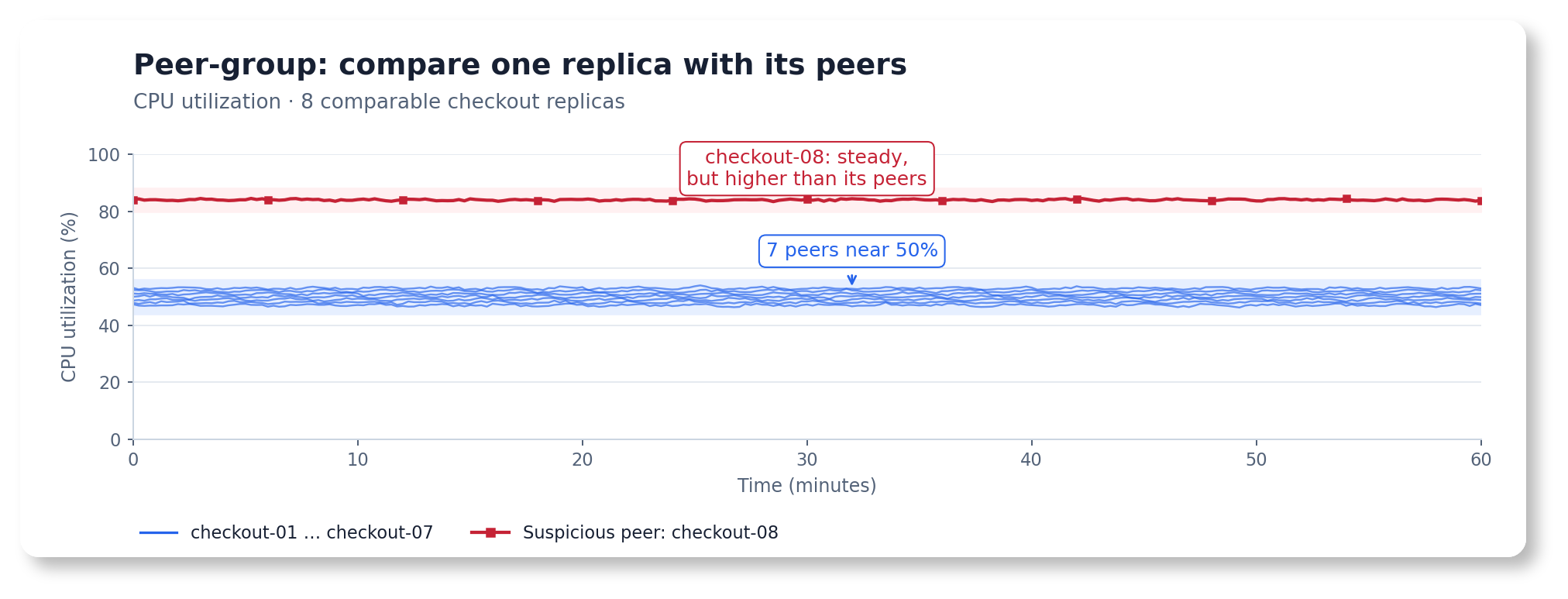
One replica stays near 84% CPU while seven comparable peers stay near 50%. Its own signal is steady, but it stands out from the group.
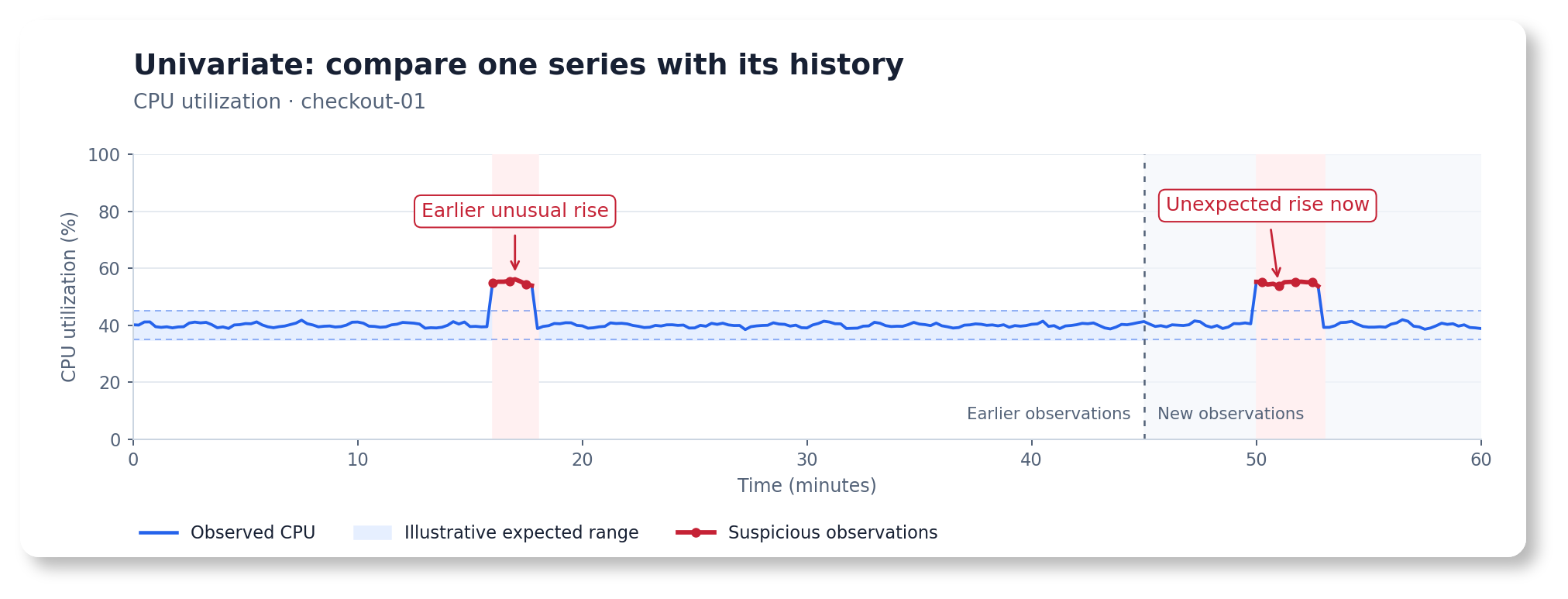
CPU utilization rises above the range learned from this instance's earlier observations.
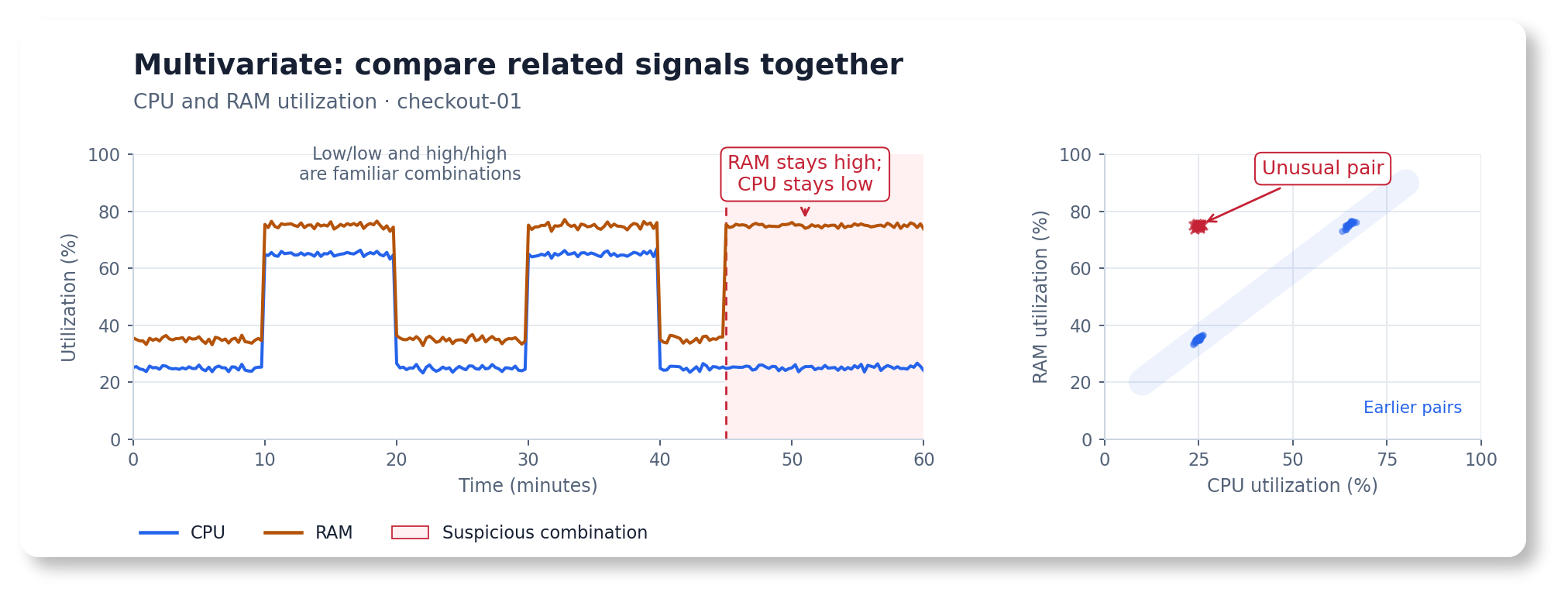
CPU stays low while RAM stays high. Each value is familiar on its own, but their combination is unusual.
Select an image to view it full size.
- Find the unusual replica. The new peer-group model scores each member separately as peers join or leave. The investigation view highlights affected peers and their behavior.
- Tune detection with your own examples. The experimental Tune workflow lets you mark known anomalies or specify an expected anomaly rate, then review and apply suggested settings across univariate, multivariate, and peer-group models.
- Estimate resources before deployment. Experimental sizing tools estimate CPU, memory, disk, and output requirements—or how much inference work fits within a resource budget. Also available through the vmanomaly MCP server v0.5.0. Validate estimates against your workload and allow extra headroom, especially for peer-group models.
- Process more data and investigate results. Inference throughput increased by up to 25% in tested workloads, depending on the model and configuration. The anomaly-score dashboard adds improved statistics, consistent filters, and forecast-disagreement trends.
Before a stateful upgrade or rollback, check the compatibility matrix and run --dryRun to preview persisted-state migration.
Read the vmanomaly changelog and the UI v1.10.0 changelog
vmestimator 0.1.18 is out: Go and Alpine security updates
#
If you’re upgrading from v0.1.16 or earlier, review the v0.1.17 update notes first. vmestimator now refuses to start if the -config file contains duplicate streams. The churn_interval stream option is replaced with calculate_churn: true, and configs that still use churn_interval fail to load.
- Security fixes: this release contains only security updates, with no new features or bug fixes. We recommend upgrading to pick up the latest upstream fixes.
- Upgrades the Go builder to Go 1.27.3: vmestimator is now built with Go 1.27.3 instead of Go 1.27.2, picking up the issues fixed in Go 1.27.3.
- Upgrades the base Docker image to Alpine 3.24.3: The base Docker image moves from Alpine 3.24.2 to 3.24.3 and includes its latest security patches. See the Alpine 3.24.3 release notes for details.
vmestimator 0.1.17 is out: Hot config reload without restarts
#
Update note: The churn_interval stream config option is replaced by calculate_churn: true. Churn is now always calculated over the stream interval, and the churn_interval label is removed from cardinality_churn_ratio metrics. Update your stream configs, dashboards, and alerts accordingly.
- Supports hot config reload: vmestimator can now reload its
-configfile without restarting, so you can change streams without interrupting cardinality estimation. Reloads are triggered by aSIGHUPsignal, by a request to the/-/reloadendpoint (protected with-reloadAuthKey), or automatically every-configCheckInterval. See the config reload docs for details. - Adds per-stream minimum cardinality: The new
min_cardinalitystream config field overrides the global-cardinalityMetrics.minCardinalityflag for individual streams. This gives you finer control over which series each stream reports. When the field is unset or0, the global flag value is used. See the vmestimator docs for configuration details. - Rejects duplicate stream definitions: vmestimator now validates the config at startup and refuses to start when two streams are effectively identical. This prevents duplicate work and conflicting metrics.
- Simplifies churn calculation: The
calculate_churn: trueoption replaceschurn_interval. Churn is always measured over the stream’s owninterval, which makes the configuration simpler and the results more consistent.
Until next month
#
We can’t promise a quiet on-call shift. We can promise that if something goes wrong, you’ll find out sooner and figure out why faster. Grab some candy and enjoy the spooky season. We’ll be back next month with more.
Leave a comment below or Contact Us if you have any questions!
comments powered by Disqus
You might also like:
VictoriaMetrics September 2026 Ecosystem Updates
September release roundup brings new releases across the VictoriaMetrics ecosystem, plus the launch of VictoriaTraces in Cloud, completing our managed observability offering of metrics, logs, and traces stack.
VictoriaMetrics August 2026 Ecosystem Updates
The VictoriaMetrics team shipped two core releases with important security fixes. The vmanomaly team shipped two updates with improved scaling and more efficient models. Plus, Tech Talks are back, this time demoing AI-assisted incident troubleshooting.
VictoriaMetrics July 2026 Ecosystem Updates
VictoriaMetrics July updates bring a new LTS release, vmestimator, and a set of improvements across the stack that make operations simpler and observability more practical.