- Blog /
- What’s new in VictoriaMetrics Anomaly Detection (2025)
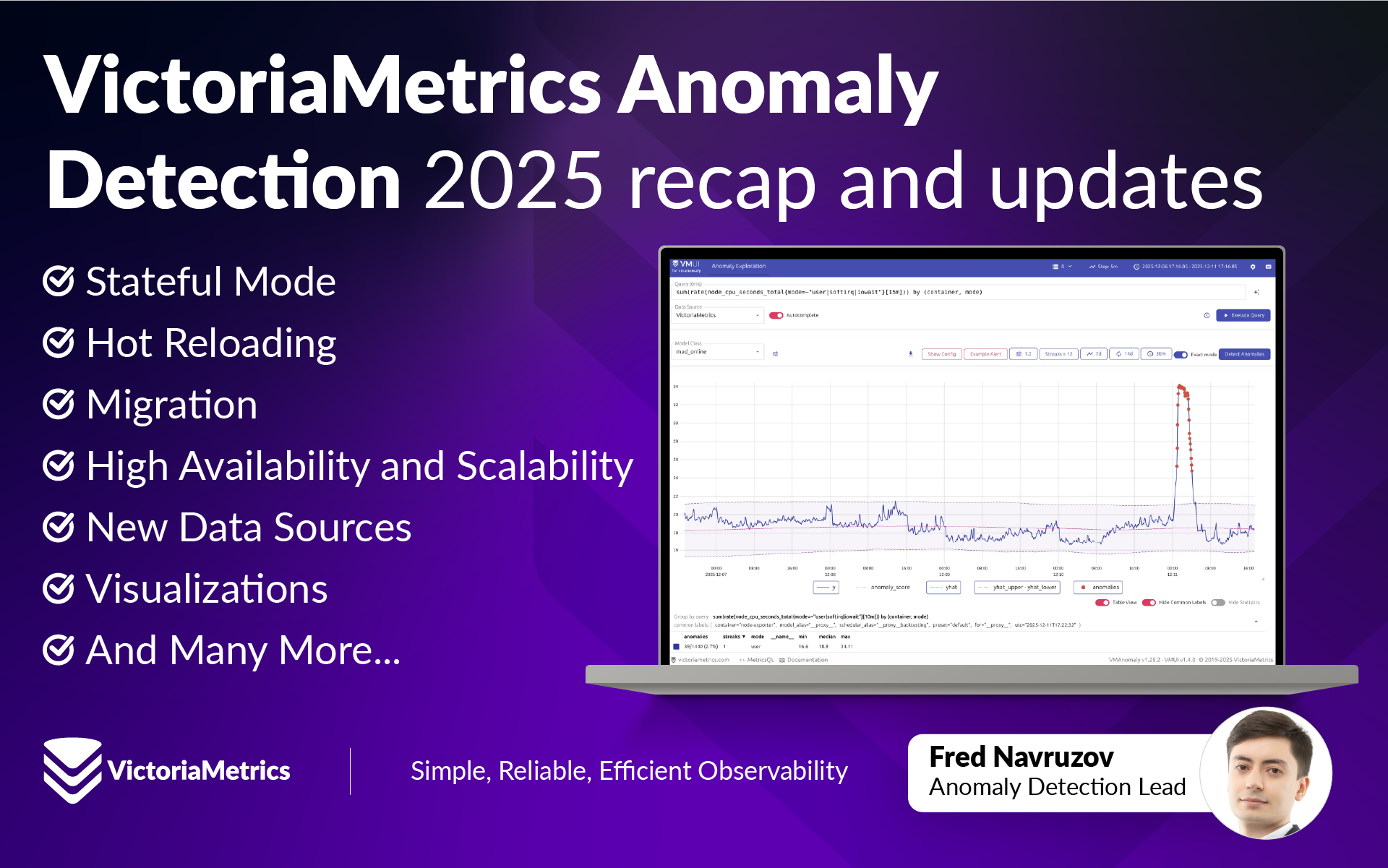
What’s new in VictoriaMetrics Anomaly Detection (2025)
Share:


It’s been a while since the last update on “What’s New” series, so I will try and keep it short yet informative.
Stay tuned for upcoming content on anomaly detection.
Series posts:
- H1'24 Updates
- H2'24 Updates
- 2025 Updates - you are here
Introduction
#
For those who might not be familiar: VictoriaMetrics Anomaly Detection (vmanomaly) is our anomaly detection product available to enterprise customers. It is designed to help teams get insights from timeseries-like data (pure metrics or message-derived metrics) received from VictoriaMetrics, VictoriaLogs or VictoriaTraces for unexpected changes in behavior, simplifying alerting rules and their maintenance, improving signal reliability and reducing operational overhead. Learn more about vmanomaly from our docs.
VictoriaMetrics Anomaly Detection has had a productive year with lots of user feedback that has had a major impact on product development. So first and foremost: a big thank you to all of our users that have contributed feedback!
We’ve added improvements across the board: in core functionality, simplicity, performance, visualisation and AI integration. In addition to bug fixes and speedups, below is a list of what was accomplished in 2025.
You can also check our Comminity Meetup chapter on vmanomaly updates in 2025 for a video overview of the key features and improvements, focusing on UI, MCP server and other major updates.
Stateful Mode
#
Stateful mode was added for operational continuity and resource optimization. This means vmanomaly can easily catch up with what has been happening if an outage takes place by persisting and restoring its state - including anomaly detection model instances and training data - between service runs, mitigating the need to have to retrain the models from scratch. Stateful deployments can also be augmented with config hot reloading, so you can make changes to your schedulers, models or data and see the effects without downtime - what can be reused, will be reused, what’s changed will be applied.
Stateful mode can be enabled by the restore_state setting (first introduced in v1.24.0) in a config.
Example use cases:
Larger anomaly detection setups requiring state and persistence across restarts where reliability and continuity are critical and refitting models from scratch is costly.
Scenarios requiring continuity for online (incrementally updated) models without losing learned patterns in accumulated state.
When deploying on Kubernetes with the VictoriaMetrics Operator, the operator utilizes StatefulSets for vmanomaly when configured for persistent storage and high availability.
For best practices, always refer to the compatibility matrix and changelog when upgrading, so no unitentional data loss occurs.
Hot Reloading
#
As mentioned above, hot reloading allows you to make changes to your configuration without restarting the service. This is particularly useful for large setups where downtime is costly or undesirable. Also, the neat side effect is that you can also override logging levels on the fly to limit the logs of desired components (like service, scheduler or reader) and troubleshoot issues without restarting the service.
Changing logging levels triggers a short-circuit check, resulting in near-instant application of the new logging level. Also, hot reloading works in both stateless and stateful modes, however, stateful mode is recommended for production deployments for a set of benefits like continuity and resource optimization.
Migration
#
As vmanomaly deployments evolve, become more complex and support state, we added a dedicated page for migrating to the latest version of vmanomaly. It covers the key changes, compatibility considerations, and best practices to ensure a smooth transition for stateful and stateless modes of operation with a compatibility matrix and list of breaking changes list.
As a part of the migration process, dry-run mode was added for convenient config validation. Now you can check what models could be lost during migration or when updating to a newer version of vmanomaly without actually applying the changes. This is particularly useful for large setups where you want to ensure that no unintended changes occur during upgrades or config modifications.
You can also get answers to your questions about migration using the MCP server, which can analyze your configs and provide recommendations for migration. Please refer to section below for more details.
High Availability and Scalability
#
To ensure continuous operation and fault tolerance, vmanomaly now supports High Availability (HA) deployments and horizontal scalability (HS) strategies based on global config sharding into sub-configurations. This allows multiple instances of vmanomaly to receive the same global config but operate on different subsets of data, models or schedulers, improving fault tolerance and load distribution.
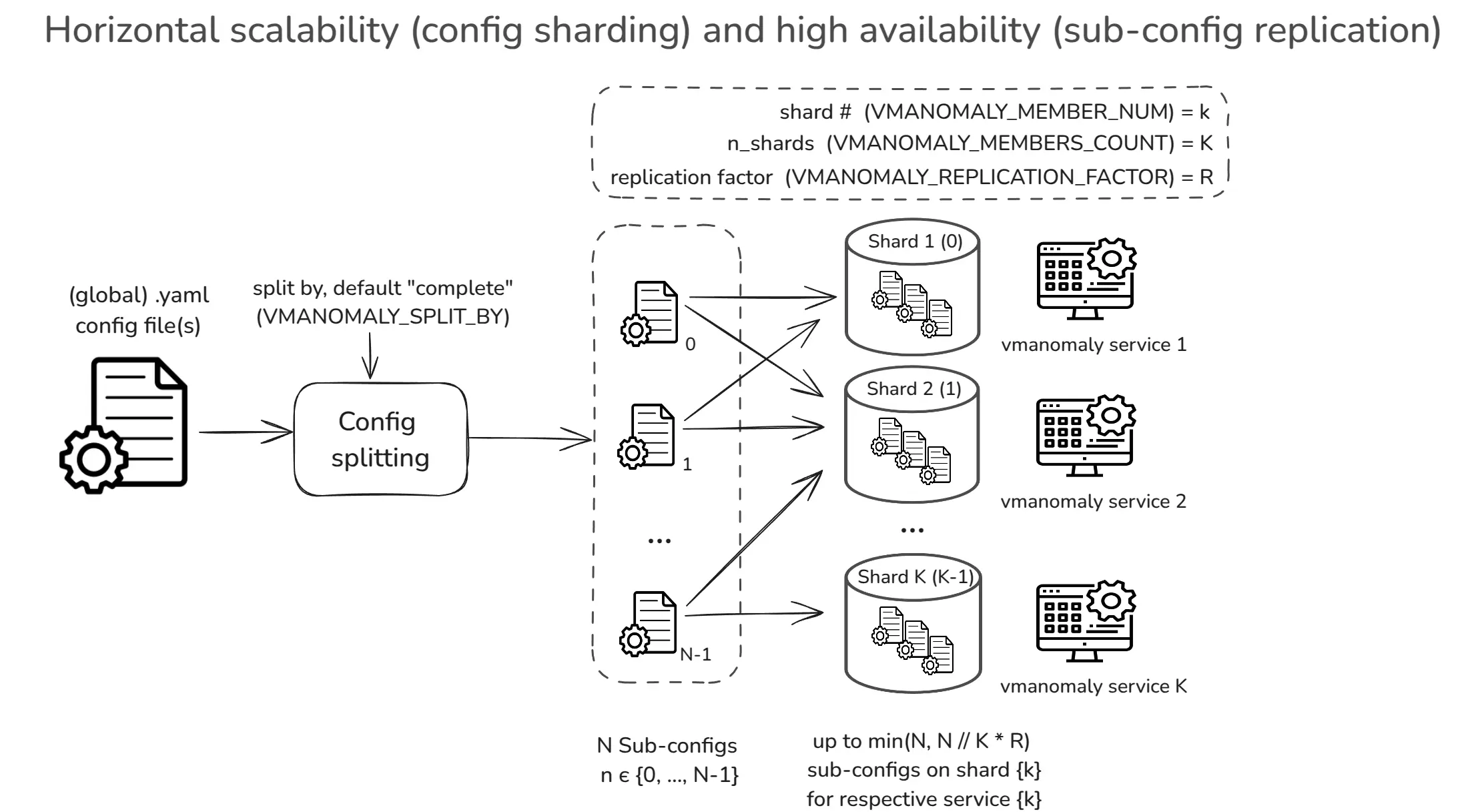
Please refer to deployment option settings for more details on how to set up HA and HS deployments for Docker, Docker Compose or Kubernetes helm charts.
Respective self-monitoring metrics are available under the vmanomaly_config_entities metric with the scope label set to shard or total, allowing you to track the load on each shard and overall capacity.
New Data Sources
#
vmanomaly now supports additional input data sources for anomaly detection through VictoriaLogs reader, allowing users to monitor log-derived and traces-derived metrics for anomalies. This expands the versatility, enabling it to handle a wider range of data sources beyond timeseries metrics from VictoriaMetrics or Prometheus, including VictoriaLogs and VictoriaTraces.
Under the hood, it leverages /select/stats_query_range endpoint of VictoriaLogs / VictoriaTraces to fetch Prometheus-compatible metrics for anomaly detection.
Switching to log-derived metrics is as simple as changing the reader type in the service config, and changing the query language to LogsQL respectively:
# other config settings, like schedulers, models, etc.
reader:
  type: vlogs
  queries:
    # good baseline series to detect drops/spikes without depending on any schema
    ingestion_volume:
      expr: * | stats count() as logs
      step: 5m
    ingestion_rate:
      expr: * | stats rate() as logs_per_sec
      step: 5m
    # catches “new sources exploded”/“sources disappeared”.
    active_streams:
      expr: * | stats count_uniq(_stream) as active_streams
      step: 3m
    # other LogsQL | stats pipe queries ...
  # other vm-like reader settings
You can test a new datasource using our public playground at https://play-vmanomaly.victoriametrics.com/logs/ with demo log-derived metrics data.
Visualizations
#
To improve user experience and facilitate easier management of anomaly detection configurations and results, several visualization tools have been introduced:
UI
#
The UI has been released to help users visualize and manage their anomaly detection configurations and results more effectively. The UI provides an intuitive interface for exploring detected anomalies, configuring models with wizard-like guidance, backtesting, copying generated configs and alerting rules to a production setup.
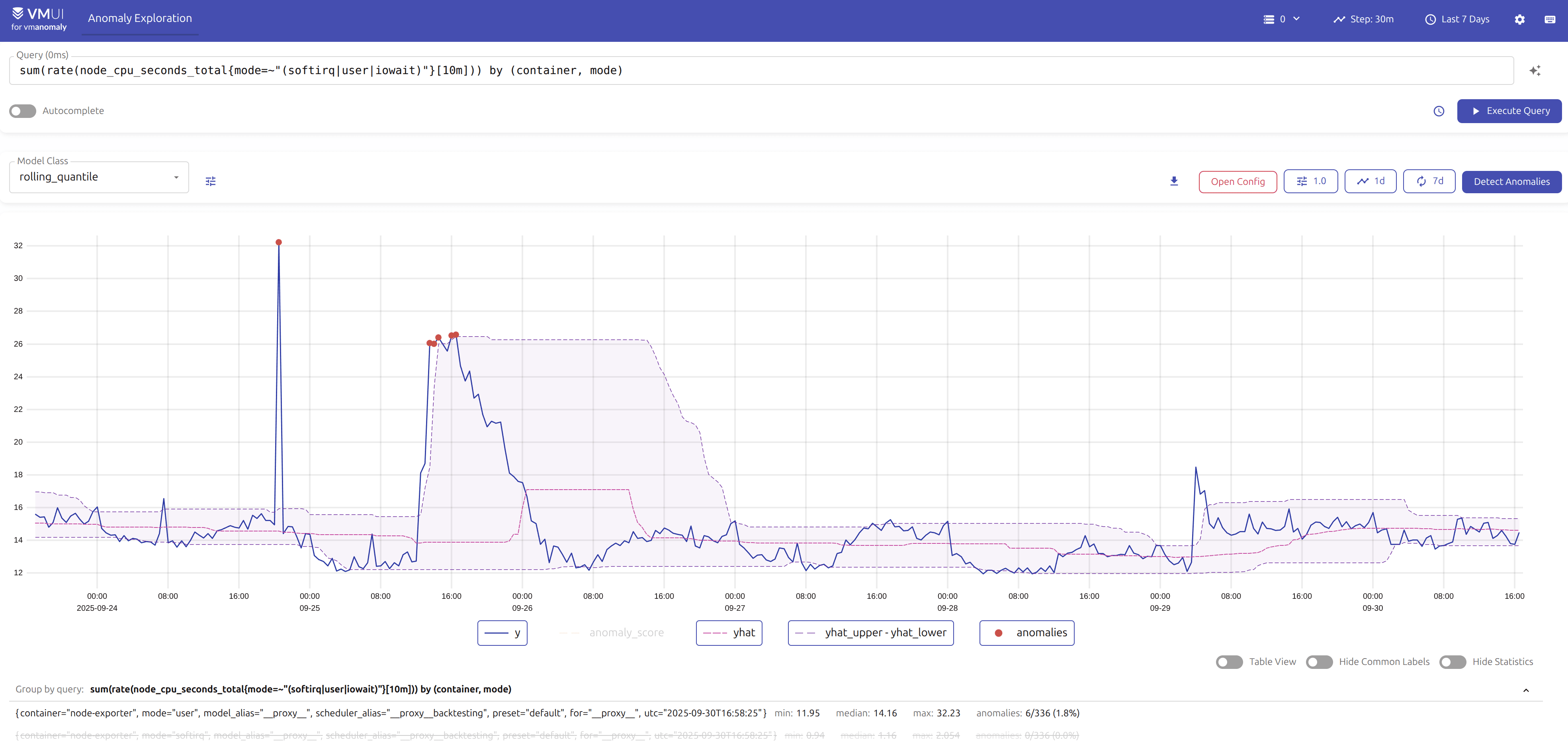
You can find usage example and detailed guide in the respective docs.
There will be more features added to the UI, e.g. chat-like MCP server integration for AI-assisted configuration generation and UI state management directly from the UI, so stay tuned for updates in 2026!
Access the UI on our public playground at https://play-vmanomaly.victoriametrics.com/metrics/ with demo data, or head to the /vmui/ endpoint of a running vmanomaly instance by following the accessibility guide.
Anomaly Score Dashboard
#
In addition to the existing self-monitoring dashboard for vmanomaly as a service, we released a Grafana dashboard for anomaly exploration with respective usage guidance. Now new deployments can have a pre-made dashboard to observe both global and per-metric anomaly statistics or act as a base for dashboard adaptation to specific needs.
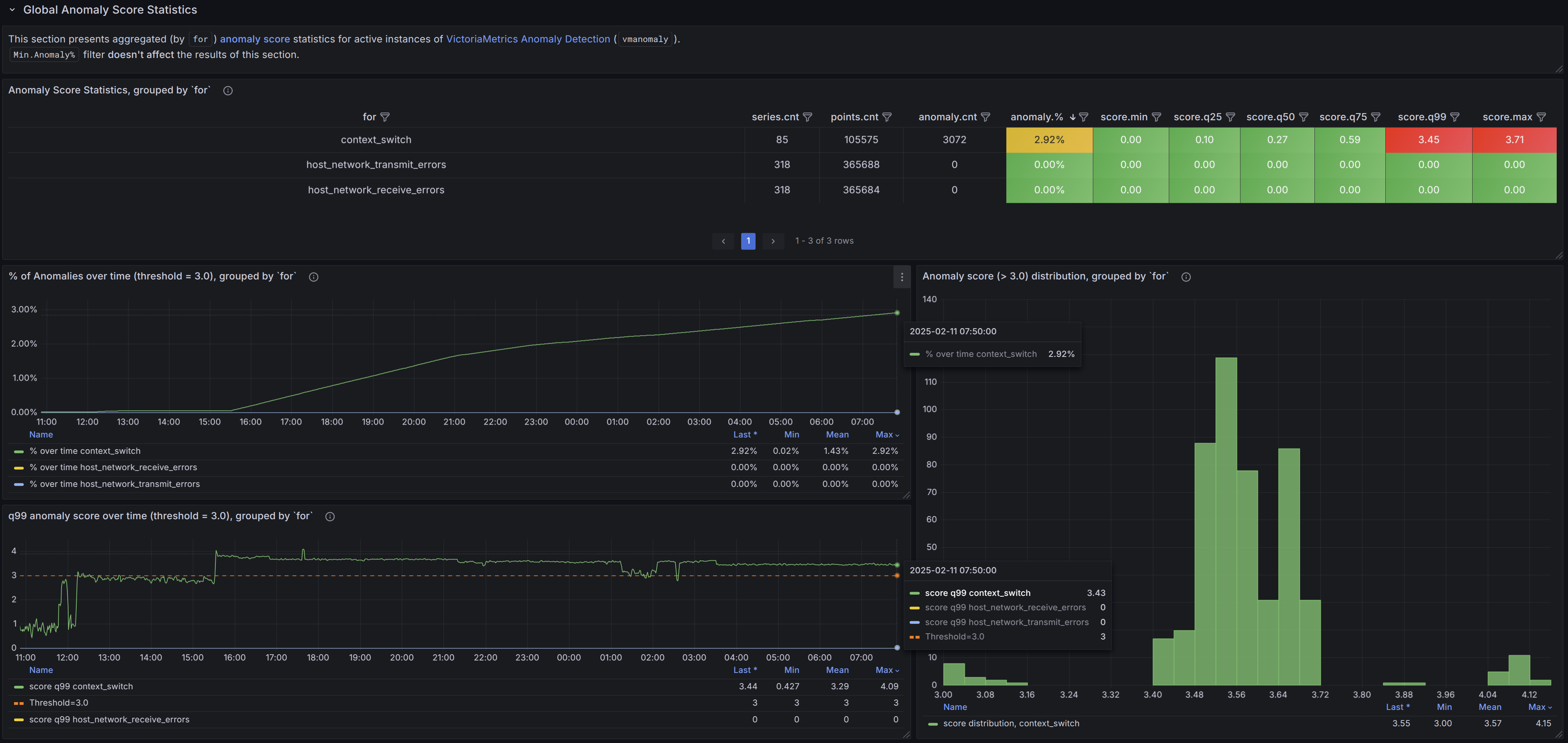
You can download the dashboard from Grafana cloud or import it directly in Grafana by ID 22922.
Public Playground
#
As vmanomaly is an enterprise-only product, we wanted to provide an easier way for users to try it out without having to get a license and setting up a full enterprise environment. Thus, we launched a public playground where users can experiment with vmanomaly using demo data, which is taken from our own playgrounds for metrics, logs and traces. respectively. This allows users to explore most of the features and capabilities of vmanomaly in a hands-on manner.
These playgrounds are pre-filled with UI default state for easier exploration. Model parameters, data ranges, input queries are all set up to provide a starting point for experimentation. Just hit “Execute Query” to see the inputs or “Detect Anomalies” to see results.
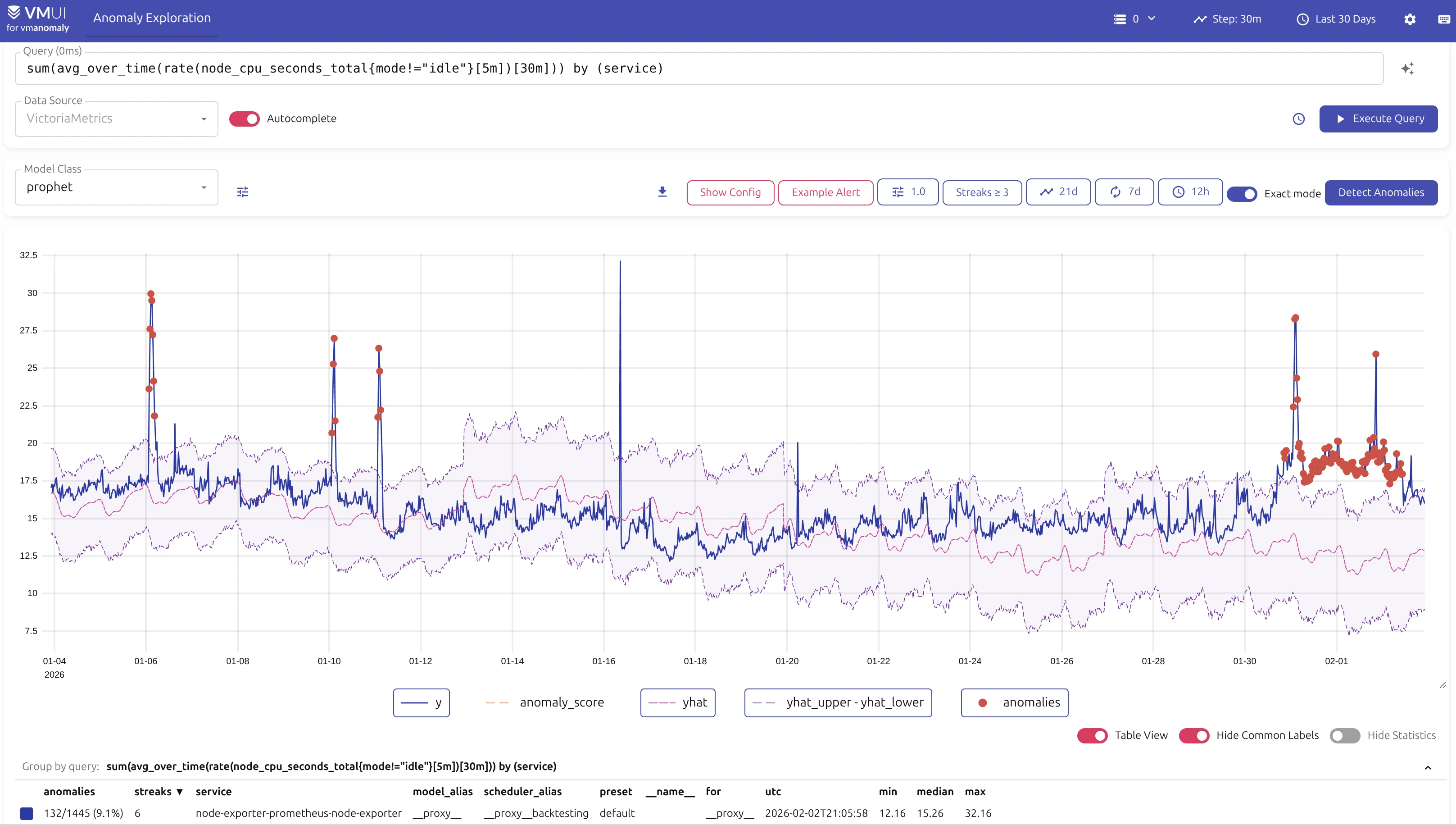
Playground links (differs in /metrics/, /logs/, /traces/ paths):
- Metrics playground - https://play-vmanomaly.victoriametrics.com/metrics/
- Logs playground - https://play-vmanomaly.victoriametrics.com/logs/
- Traces playground - https://play-vmanomaly.victoriametrics.com/traces/
MCP Server
#
On the back of the successful integration of VictoriaMetrics with MCP, we released the MCP server for vmanomaly which provides AI-assisted interaction for users. It can help with various tasks related to vmanomaly, including but not limited to:
- Configuration generation: Generate initial configuration files based on user requirements and best practices. Also, it can be used to fix issues in pasted configs with config validation tool.
- Alerting rule suggestions: Suggest and validate alerting rules based on user-defined criteria.
- Migration assistance: Analyze existing configurations and provide recommendations for migrating to newer versions of
vmanomaly. - Service health checks: Diagnose common issues and suggest fixes based on metrics from
vmanomalyinstances. - Documentation and learning: Answer questions about
vmanomalyfeatures, usage, and best practices like incorporating domain knowledge, with full-text search over integrated official docs. - Version used: Find out which version of
vmanomalyand its UI is being used in your setup by simply querying the MCP server.
MCP server can be easily deployed using binaries, built from source, or via Docker. Please refer to the installation guide for instructions about integrations with clients like VS Code, Jetbrains or similar.
Here is an example output from interaction with MCP server for config suggestions based on user requirements:
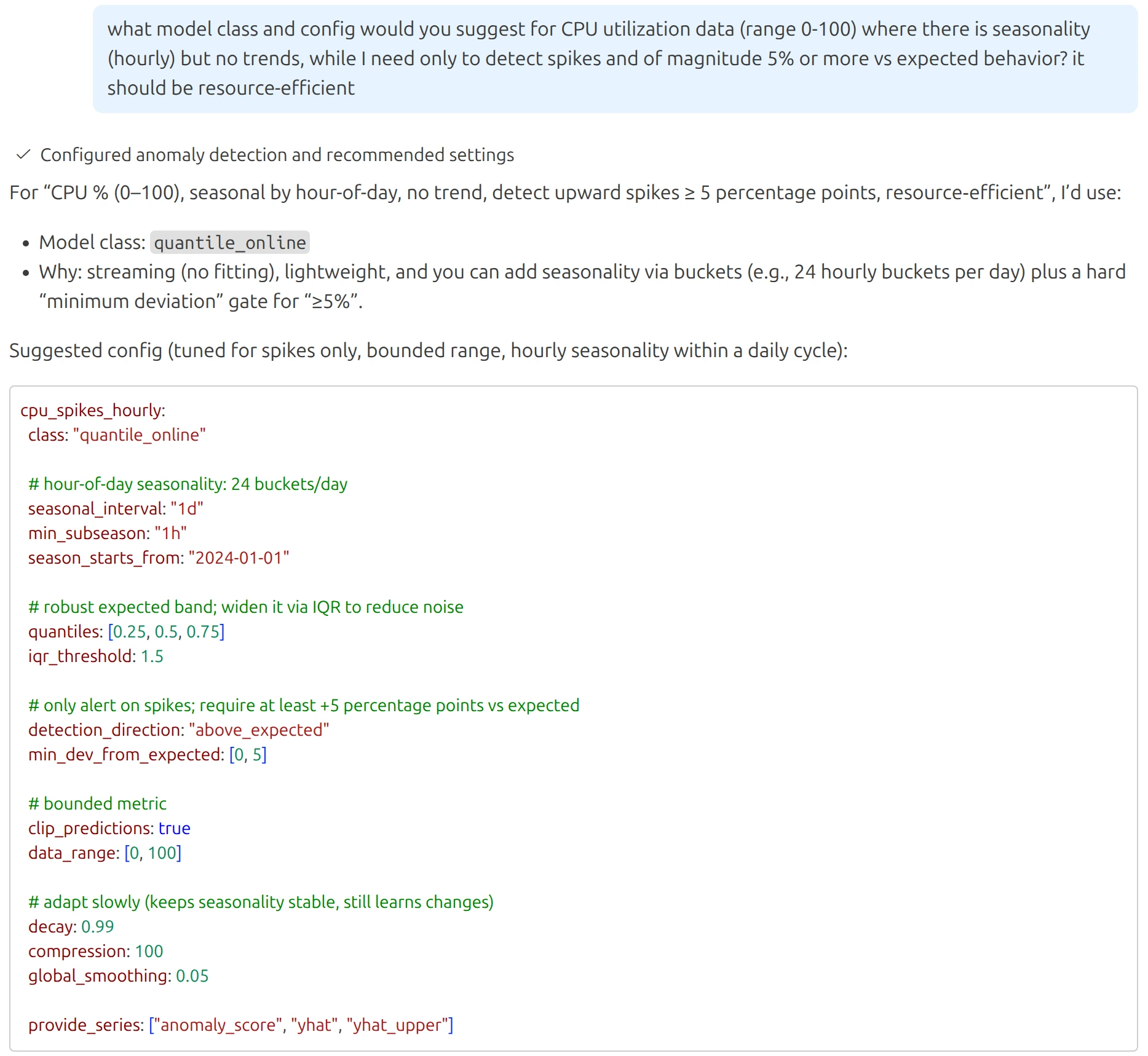
MCP server will gradually receive more features and improvements over time, so stay tuned for updates in 2026!
Forecasting Mode
#
Well, now it is really the last point before the wrap-up and future plans - forecasting mode was added to complement existing anomaly detection models. It allows users to generate future data points at current timestamps based on historical behavior, which can be useful for capacity planning, trend analysis, and proactive monitoring, where alerting rules can be enriched with forecast metrics.
What’s Next?
#
We have a lot of plans for 2026, including but not limited to:
- Chat-like interaction inside the UI with MCP server for AI-assisted configuration generation and management.
- New anomaly detection models and improved existing ones for better accuracy and performance.
- Simplifications in onboarding, management and maintenance of anomaly detection setups.
- Dynamic presets with metric-subset discovery (e.g. Kubernetes, VictoriaMetrics, node-exporter) and smart AI-assisted artifact generation (configs, alerting rules, etc.)
- Root-cause analysis for assisted causal incident drill downs.
- Integration with VictoriaMetrics Cloud for seamless anomaly detection as a service experience.
Stay tuned!
I am Fred Navruzov and have previously worked as a Data Science Lead at Ukrainian and international companies such as Competera, Rozetka, and TiltingPoint. Since 2023, I have been leading the Anomaly Detection team at VictoriaMetrics.