- Blog /
- VictoriaLogs vs Loki, Elasticsearch, OpenSearch, SigNoz and ClickStack on structured log ingestion
VictoriaLogs vs Loki, Elasticsearch, OpenSearch, SigNoz and ClickStack on structured log ingestion
Share:


At VictoriaMetrics, we constantly benchmark our products. This helps us stay competitive and make every release better. As VictoriaLogs reaches more teams, more of them ask us which use cases it fits, and what they would gain by switching to it. So we publish our benchmark as a public repository that anyone can run to reproduce our results, and we will keep developing it in the open.
This is not a marketing post that tells you to switch to VictoriaLogs in every case. Instead, if you collect structured logs, from Kubernetes or anywhere else, it should help you choose the right tool, with the trade-offs that suit you.
Benchmarks that compare systems are always controversial, because each system is good at different use cases. This post only tests one case, ingesting structured logs, where every line has named fields, as many services on Kubernetes write them. Each system runs on one machine of the same size. Query performance, cluster mode and object storage will come in later posts.
Ingestion speed alone does not tell you which system to choose, so this post also looks into their internals:
- Why does Loki ingest the most, yet take minutes for a simple dashboard query?
- Why do SigNoz and ClickStack lag behind VictoriaLogs, though all 3 store logs in columns?
- Why do Elasticsearch and OpenSearch need so much disk?
The answers help you plan hardware and costs, and avoid surprises as your logs grow.
The test and the setup
#
We test recent releases of 6 systems as of October 2026, with settings close to their defaults:
We changed a few settings so that each system can reach the limit of its design on one node, such as Loki’s ingestion limits. VictoriaLogs needed no changes, because it is designed to give its best performance out of the box (docs). The repository explains every change.
To keep the test simple, each system runs in single-node mode on its own Kubernetes node (n2d-standard-8 on GCP, with 8 vCPUs and 32 GB of RAM). SigNoz and ClickStack store logs in ClickHouse, which cannot receive logs from log shippers on its own. So each stack runs its own collector, built on the OpenTelemetry collector, on the same node as ClickHouse.
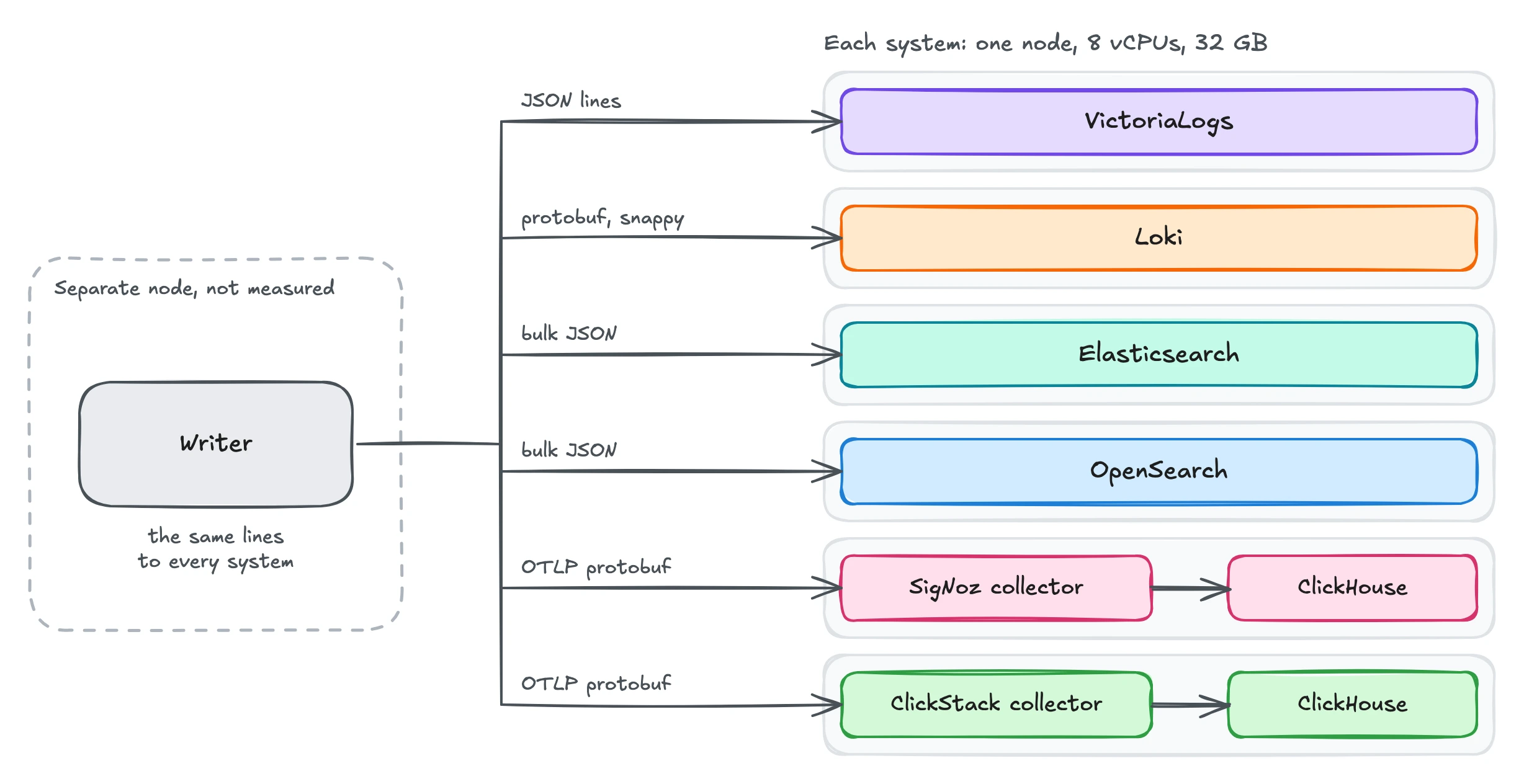 The test setup: one writer sends the same logs to 6 systems.
We send the same logs to every system at the same time. The rate starts at 10k lines/s and goes up by 10k every 10 minutes, up to 180k lines/s. The maximum ingestion rate of a system is the highest rate it stored, averaged over a full 10-minute step. If a system crashes, we only count the steps before its first crash, since a crash is its limit.
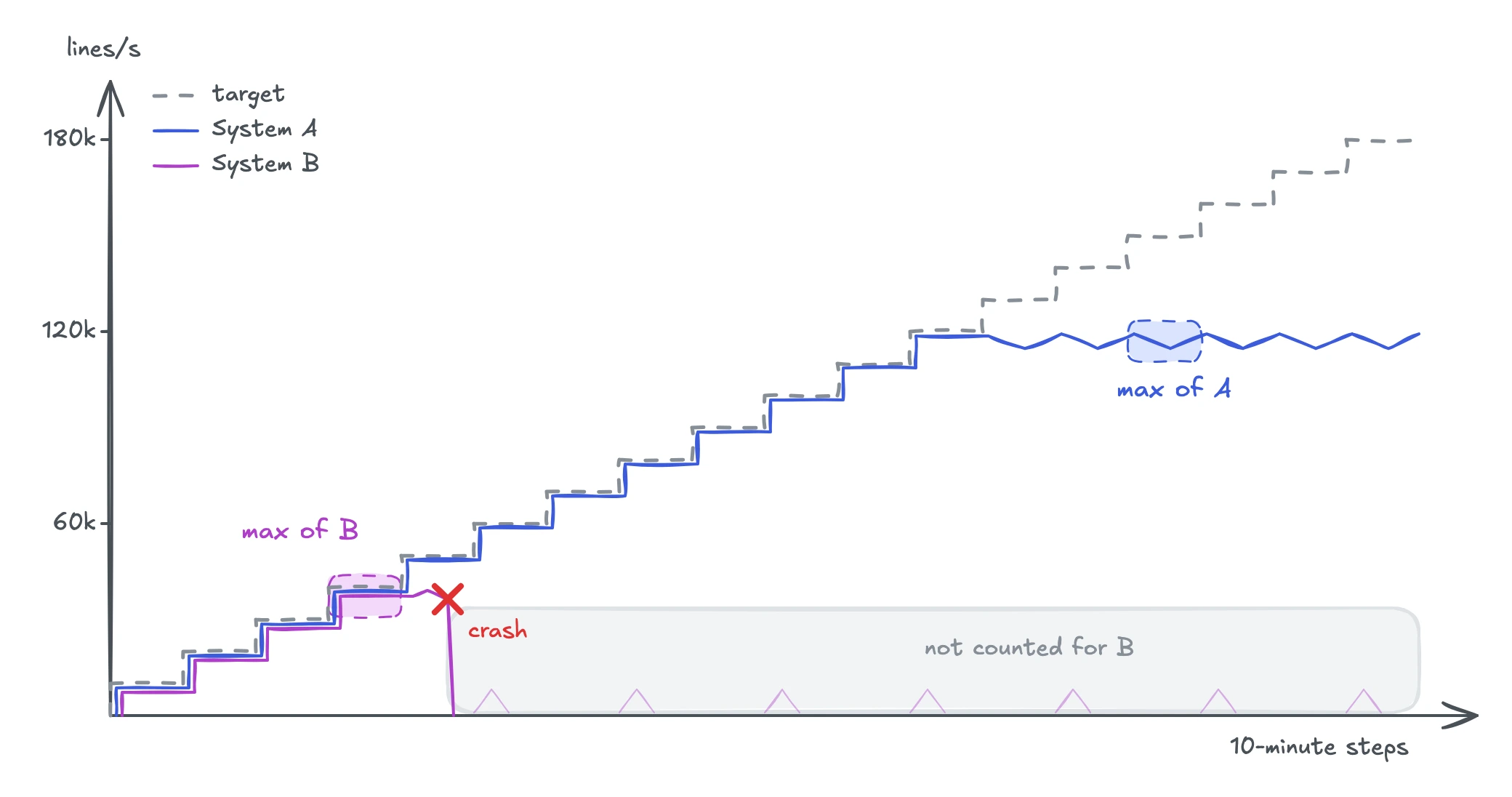 How the maximum ingestion rate is read.
We count the lines that each system stored, not the ones it accepted. SigNoz and ClickStack, for example, answer as soon as their collector receives the lines, so a collector crash loses lines that were already accepted. Loki is the exception. It has no cheap way to count its stored lines, but it writes every line to its write-ahead log before it answers, so for Loki we count the accepted lines.
The ingestion rate is only half of the story. To show how it relates to query speed, we loaded VictoriaLogs, Elasticsearch and Loki with the same logs at 35k lines/s for 4 hours, and then timed a few common queries on them with cold caches. We will look at queries in depth in a later post.
The workload that each system receives
#
Logs can be anything from plain text to wide events with hundreds of fields. This test picks the middle, a structured log line with 30 to 40 fields, which is typical for Kubernetes. The app writes about 20 to 30 of these fields, and the log shipper adds about 10 more, such as the namespace, node and labels.
Picture a Kubernetes cluster of 125 nodes, where each node runs 40 pods of different apps. The logs of each pod form one log stream, so this cluster has 5,000 log streams. It is a mid-sized cluster, similar to many that we see among VictoriaLogs users.
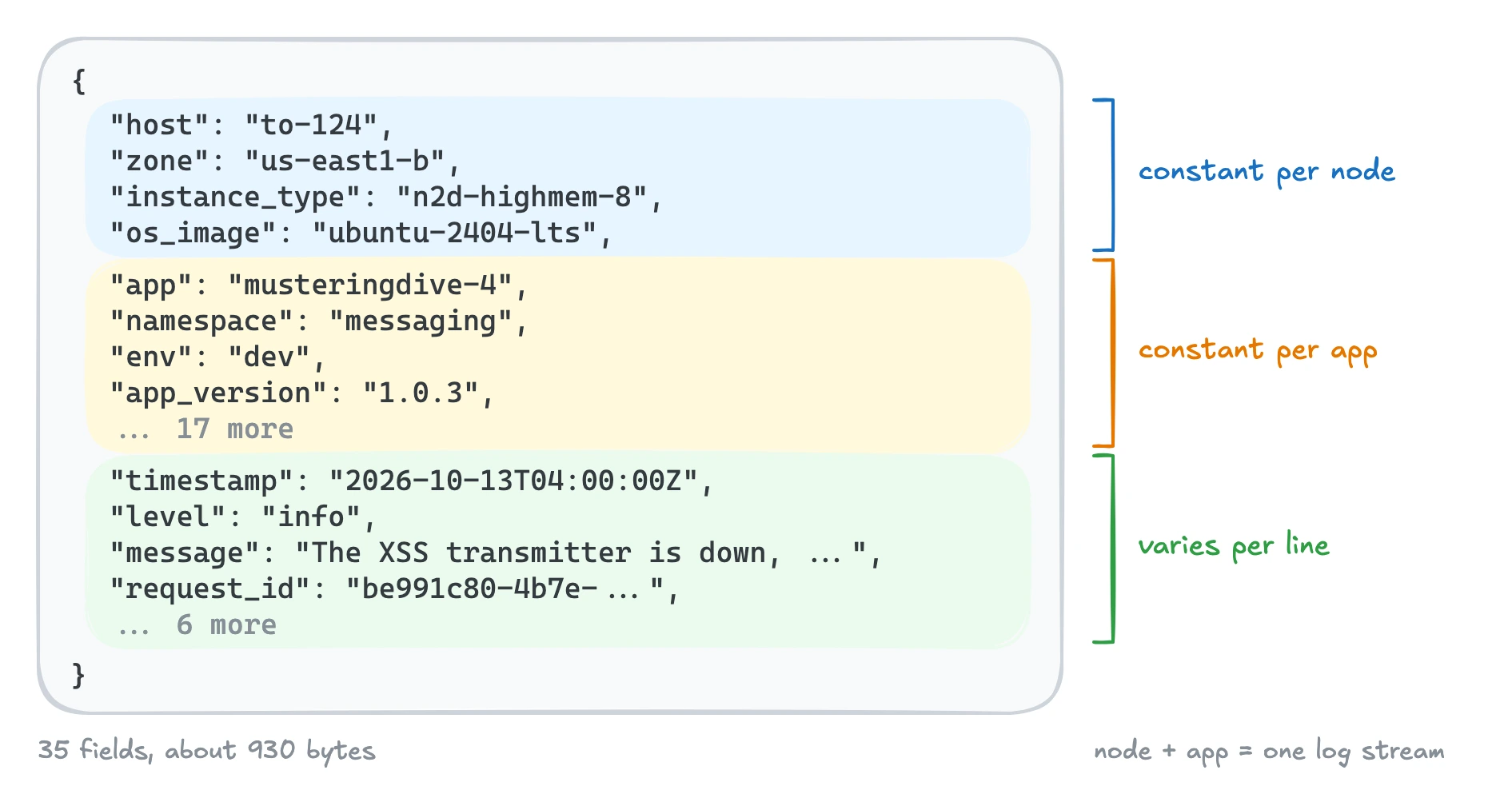 One log line of the test, with its fields grouped by how often they change.
We want to see how far each system can go with its own design. So each system receives the logs in its preferred format. For example, Loki usually receives protobuf from Grafana Alloy. We do not send the same format, such as OTLP, to every system. If we did, we would also measure how well each system converts that format, not only how it stores logs.
In practice, logs often start as JSON on stdout. So a log shipper has to convert them, and this also costs CPU. If enough readers ask for it, we can also run the test with one common format, such as JSON or OTLP.
Results
#
We ran the main ingestion test 3 times, and the results below are the median of the 3 runs. The full tables are in the repository.
For SigNoz and ClickStack, the CPU and memory include the collector, ClickHouse and their helper services.
The few extra tests that we mention in this post, such as the queries, are one-off runs outside the repository.
Maximum ingestion rate (lines/s)
#
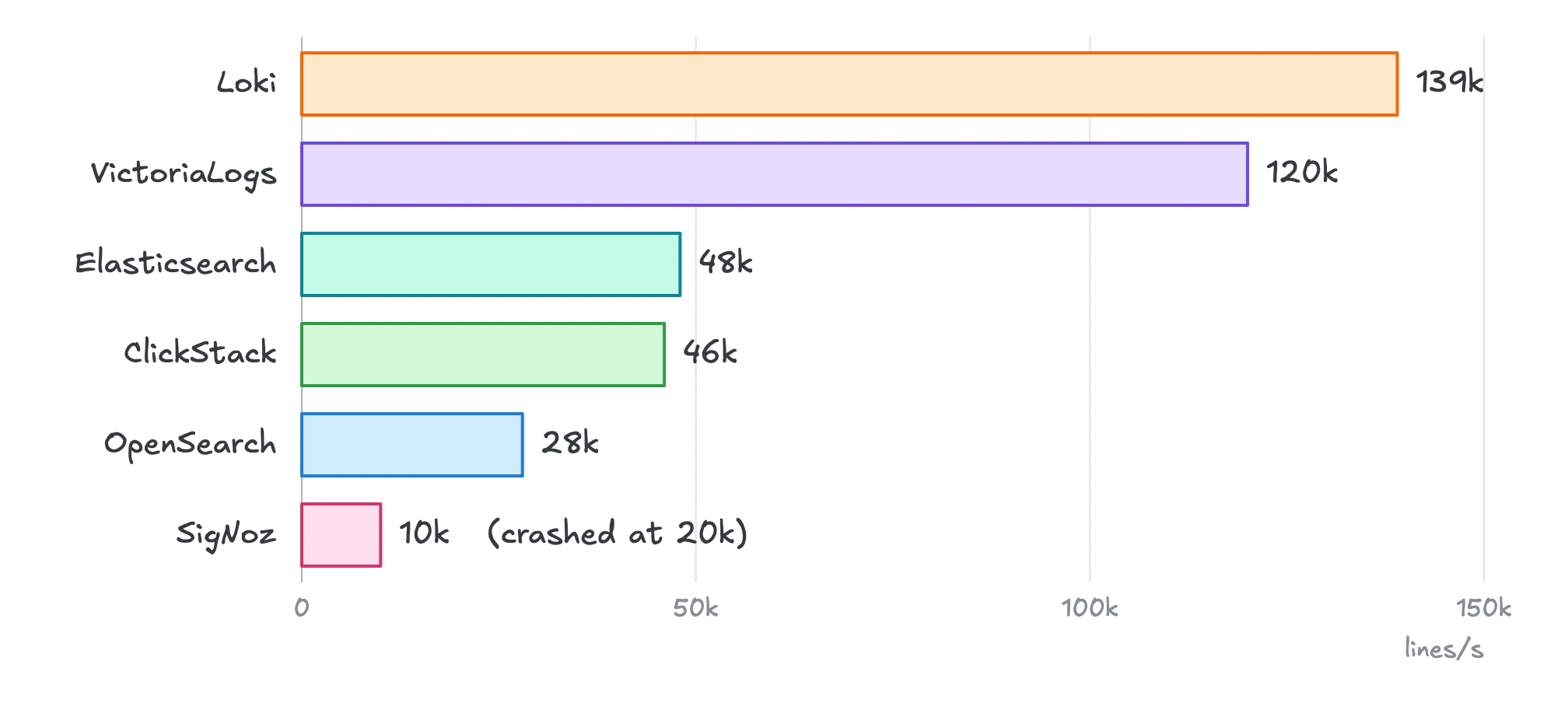 Maximum ingestion rate of each system.
- Loki ingested the most, 139k lines/s.
- VictoriaLogs came second, with 120k.
- Elasticsearch, OpenSearch and ClickStack reached 28k to 48k.
- SigNoz reached 10k lines/s and crashed at 20k.
One line is about 930 bytes of JSON, so 120k lines/s is about 106 MiB/s, or about 9 TiB of raw logs per day.
Each of these numbers comes with a trade-off in query speed, cost or the type of logs. We explain them in Why the results look this way.
CPU usage (cores)
#
Average CPU cores at each ingestion rate. A line ends at the last rate that the system kept up with, for example 40k lines/s for Elasticsearch.
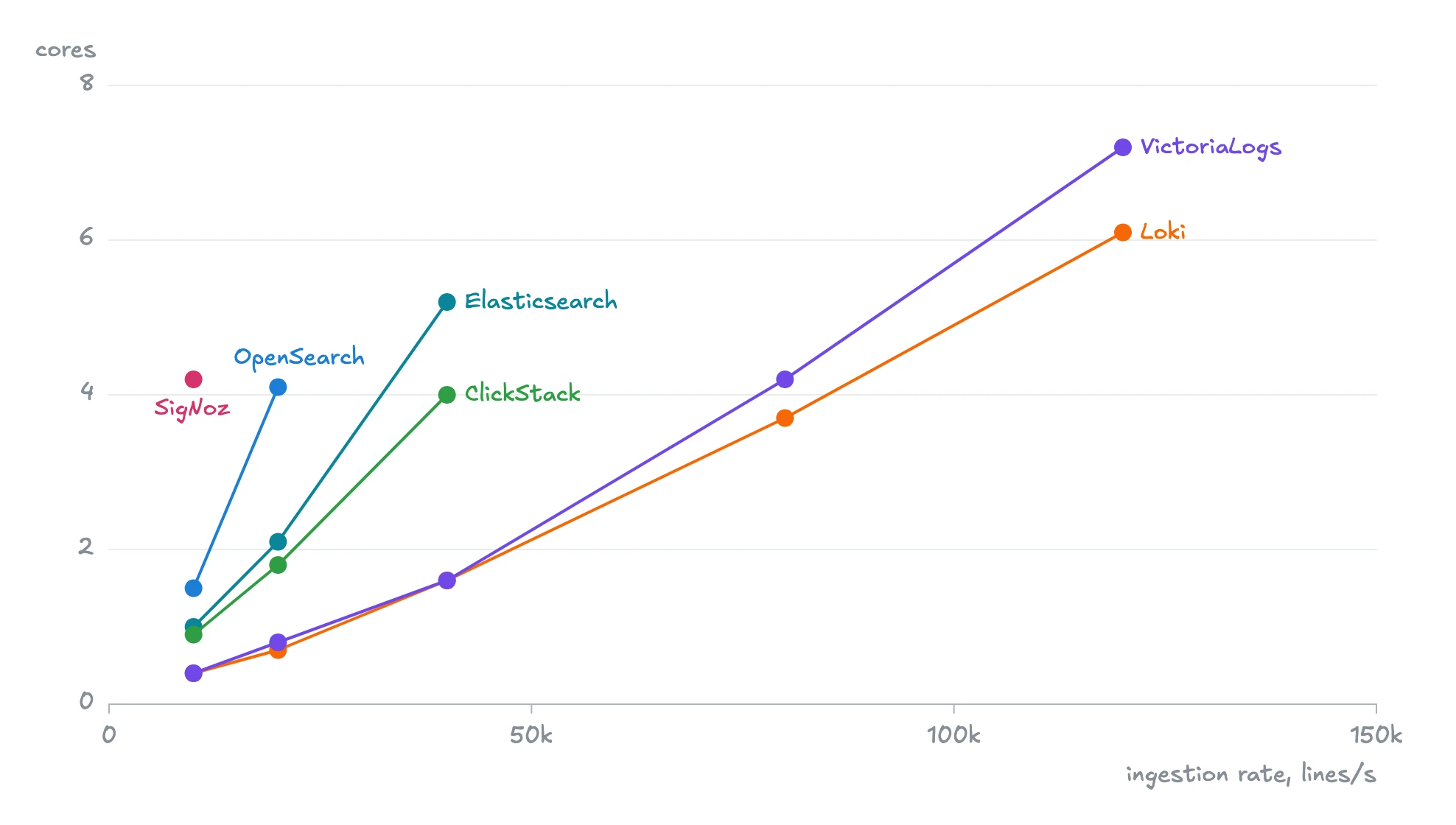 CPU usage at each ingestion rate.
- At 10k lines/s, the only rate that every system handled, VictoriaLogs and Loki used 0.4 cores, ClickStack 0.9, Elasticsearch 1.0, OpenSearch 1.5 and SigNoz 4.2.
- The gap grows with the rate. At 40k lines/s, VictoriaLogs and Loki used 1.6 cores, ClickStack 4.0 and Elasticsearch 5.2.
- At 120k lines/s, Loki used 6.1 cores and VictoriaLogs 7.2.
CPU was the limit for most systems in this test.
Memory usage (GiB)
#
Peak memory at each ingestion rate, without the OS page cache. A line ends at the last rate that the system kept up with.
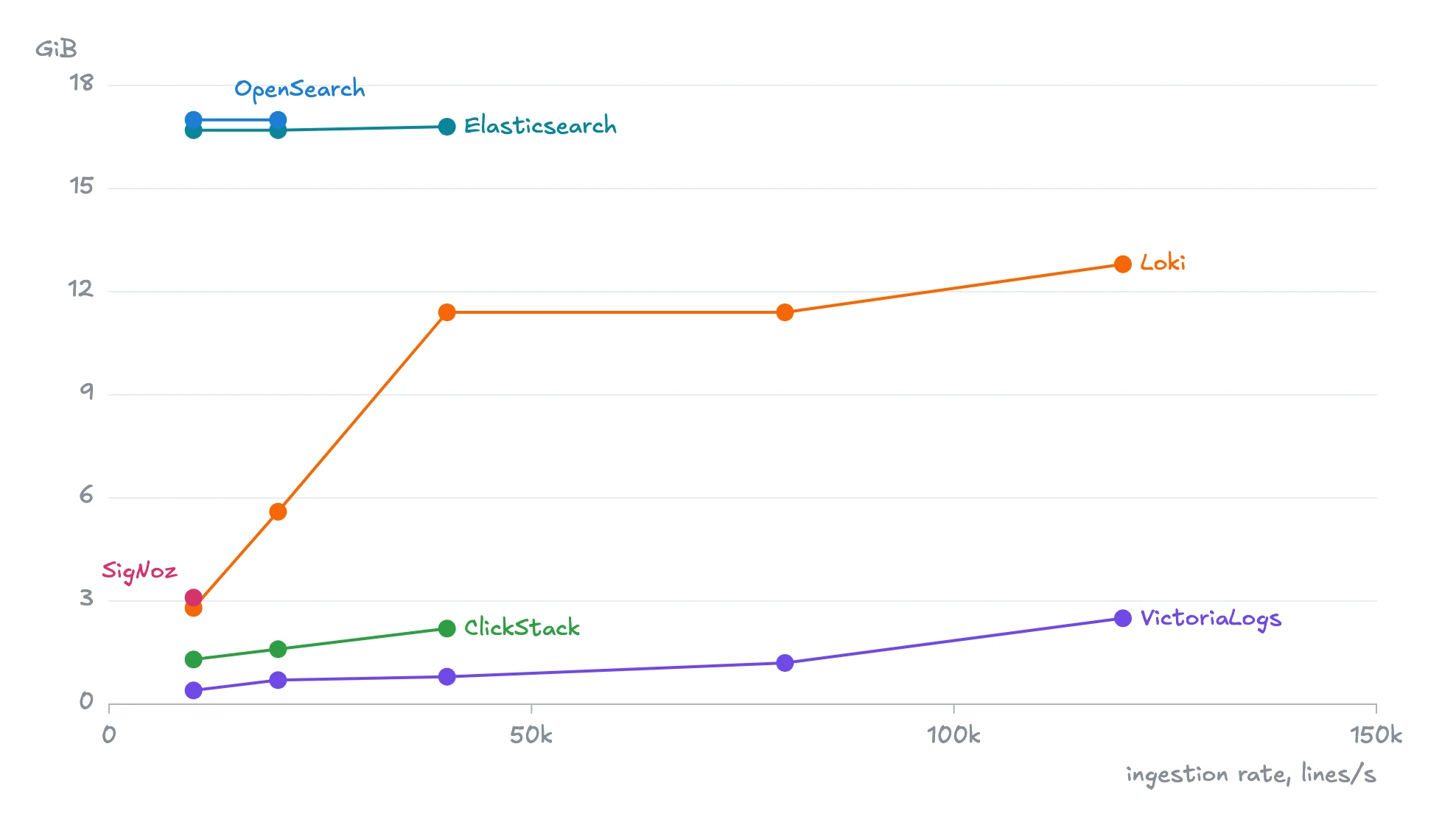 Memory usage at each ingestion rate.
- VictoriaLogs used the least memory at every rate, 14x less than Loki at 40k lines/s.
- Elasticsearch and OpenSearch used about 17 GiB whatever the rate, because they reserve a fixed heap at startup. By default, Elasticsearch sizes it at half of the machine’s memory (source code). OpenSearch does not size it automatically, so we gave it the same size.
- ClickStack used 1.3 GiB at 10k lines/s and 2.2 GiB at 40k lines/s.
- SigNoz used 3.1 GiB at 10k lines/s, its only point on the chart.
Memory decides how big, and how expensive, the machine must be, and how much is left for caching and queries.
Disk space
#
This chart shows how much disk each system needs for one million log lines. As a reference, one million lines take about 887 MiB as raw JSON. SigNoz is N/A because its collector kept crashing, so it stored too few lines, and its numbers changed too much between runs to compare.
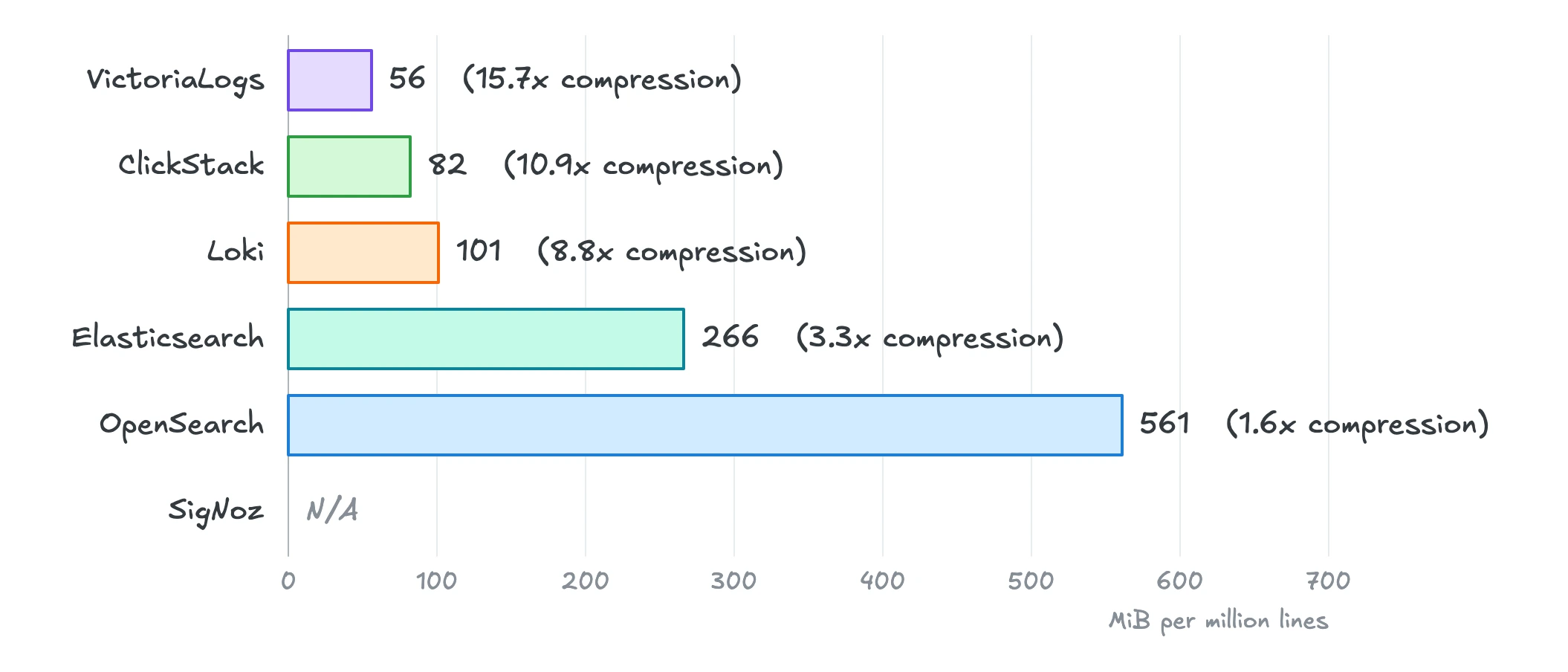 Disk space for every million lines.
- VictoriaLogs needed the least disk, followed by ClickStack and Loki.
- Elasticsearch needed almost 5x more than VictoriaLogs, and OpenSearch 10x more.
Logs are often kept for weeks, so the disk space grows quickly. For example, 30 days of logs at 50k lines/s take about 7 TiB in VictoriaLogs, 12 TiB in Loki and 33 TiB in Elasticsearch.
Disk writes
#
This table shows how many bytes each system writes to disk for each line it stores. This is more than the final size on disk, because each system rewrites its data from time to time to keep it compact and fast to search. N/A means that the system could not keep up with that rate.
| System | 10k | 20k | 40k | 80k | 120k | 150k |
|---|---|---|---|---|---|---|
| Loki (protobuf) | 1,108 | 1,234 | 1,411 | 1,251 | 1,210 | N/A |
| VictoriaLogs | 323 | 284 | 226 | 223 | 163 | N/A |
| Elasticsearch | 1,393 | 1,815 | 1,917 | N/A | N/A | N/A |
| OpenSearch | 2,295 | 3,197 | N/A | N/A | N/A | N/A |
| SigNoz | 1,420 | N/A | N/A | N/A | N/A | N/A |
| ClickStack | 414 | 461 | 572 | N/A | N/A | N/A |
VictoriaLogs also wrote the least to disk. Loki wrote 3x to 7x more per line, depending on the rate.
This matters because every disk has a limit on how many bytes it can write per second, and faster disks cost more. In our test, we used 500 GiB pd-balanced disks on GCP, which can write up to 280 MiB/s, so no system reached that limit before it ran out of CPU. Still, VictoriaLogs lets you use cheaper disks, and on your own hardware, it wears out your SSDs much more slowly.
Why the results look this way
#
Loki
#
Loki’s high ingestion rate surprised us, but its design explains it. Loki is built to store a lot of logs and later read a few streams over a short time range. So it only indexes the stream labels (here, node and app), and stores each line as is. In contrast, VictoriaLogs splits every line into fields and stores each field separately, so queries are faster later. This costs about 18% more CPU than Loki at 120k lines/s.
How you send logs to Loki matters too. Grafana Alloy and Vector send protobuf by default, but Fluent Bit, Fluentd and Logstash send JSON. With JSON, Loki reached about 99k lines/s in a separate run, below VictoriaLogs, because handling JSON costs it much more CPU than protobuf. So if you run Loki, prefer Alloy or Vector.
Loki’s design has 3 costs. The first cost is memory. Loki keeps the newest lines of every stream in memory, so it can compress them together. This means its memory grows with the number of streams. You get more streams in a bigger cluster, or in any cluster during a deployment, since every new pod starts a new stream. To see how much memory this takes, we also ran the test with 10,000 and 15,000 streams.
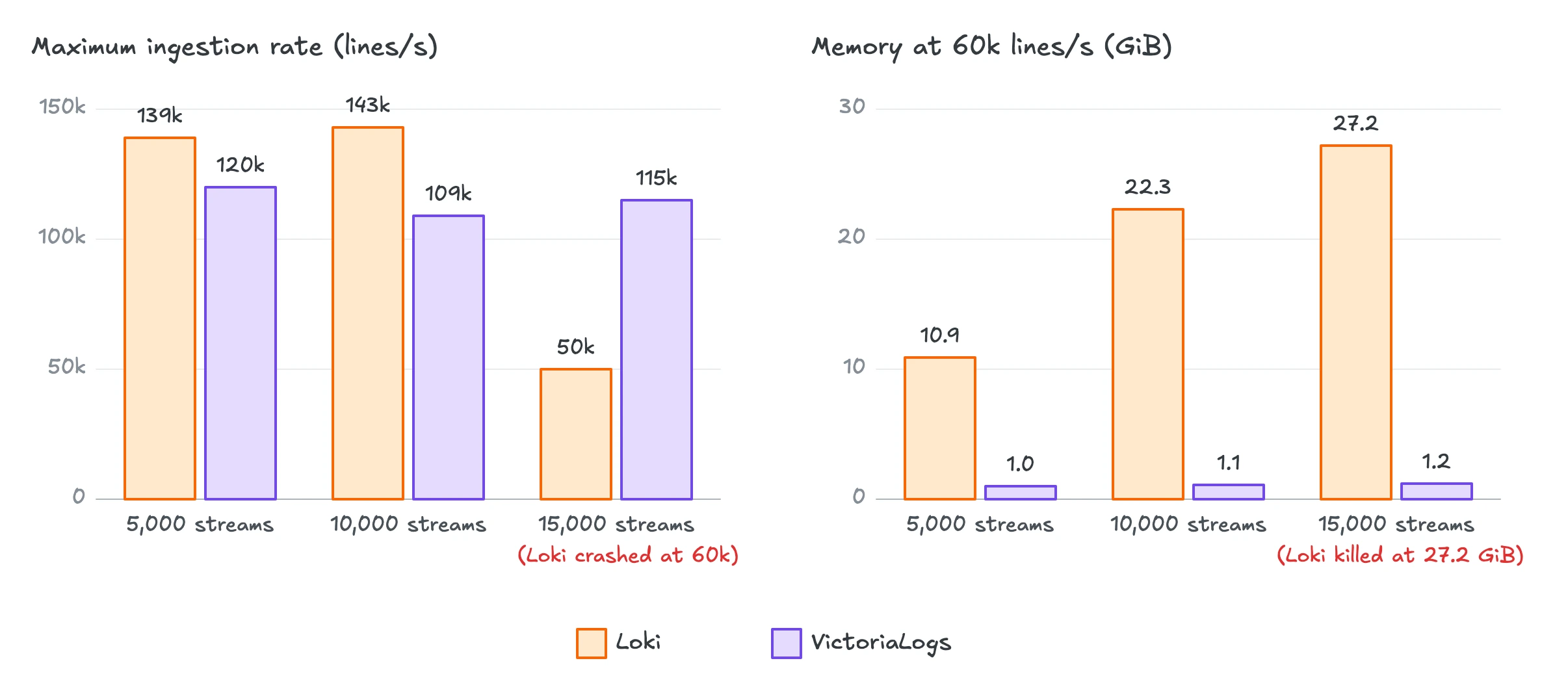 Loki and VictoriaLogs with 5,000, 10,000 and 15,000 streams.
With 15,000 streams, Loki ran out of memory at 60k lines/s and was killed. VictoriaLogs needed only 0.2 GiB more with 3 times the streams. More memory means a bigger machine, and less memory left to cache data for queries.
The second cost is disk. Loki compresses the lines as plain text. It does not use the fields inside the lines to compress them better, as VictoriaLogs and ClickHouse do, so it needs 1.8x more disk than VictoriaLogs.
The third cost, which matters most, is query time. Loki can only narrow a query down by its labels. Anything else, a word or a field value, means decompressing and scanning every line of the matching streams. On the same logs, the queries from the setup took this long.
| Question | Time range | VictoriaLogs (s) | Loki (s) |
|---|---|---|---|
| Count the errors of one app | 1 hour | 0.06 | 3.5 |
| Count the errors of every app | 1 hour | 0.59 | 171 |
| Newest 100 lines with a common word | 1 hour | 2.5 | 32 |
| p99 latency of every app | 1 hour | 1.9 | 302 |
| Top 10 request paths | 1 hour | 8.8 | refused, more than 500 series |
These are everyday questions when you investigate an incident or build dashboards and alerts. Loki took half a minute or more on all of them except the first, or refused to answer. The first query reads only one app through its labels, and even that was almost 60x slower than in VictoriaLogs.
Loki is adding ways to search fields faster, such as bloom filters, but they are still experimental, off by default and not available on a single node, so we left them off.
These slow queries do not make Loki a poor choice for logs in general. It is built to keep logs cheap in object storage, and to scale out over many query workers when you need to run large queries. On our single machine, it took 171 seconds to count the errors of every app in one hour, using about half of the 8 cores. By a rough estimate, to answer in about 2 seconds, the same scan would need about 300 cores. So Loki suits you if you want to store a lot of logs cheaply in object storage, and either read only a small part of them or can pay for many cores to search them fast.
If that is more than you want to pay, and you still need dashboards and searches to answer in seconds, read on.
Elasticsearch and OpenSearch
#
OpenSearch is a fork of Elasticsearch, so this section mainly covers Elasticsearch and ends with how OpenSearch differs.
Loki indexes almost nothing and pays for it at query time. Elasticsearch does the opposite. It stores every line in 3 forms:
- The original JSON of the line.
- An inverted index, a dictionary that maps every word and value to the lines that contain it, so a search goes straight to the matching lines.
- The fields again in columns (doc values), for sorting and aggregations.
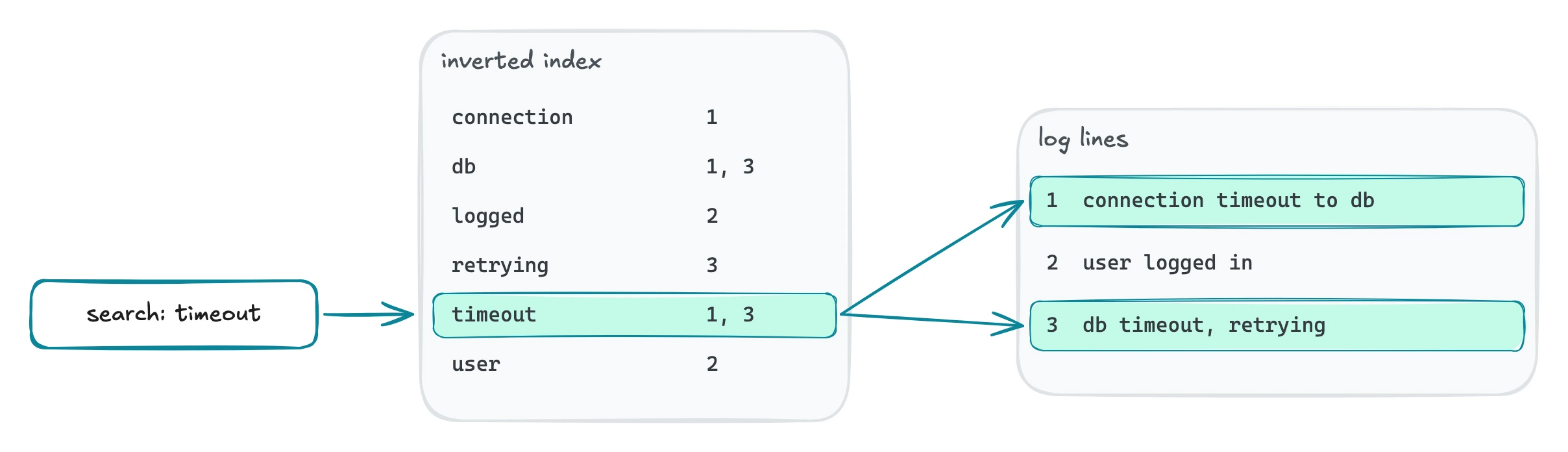 How an inverted index finds a word.
All this makes ingestion expensive. At 40k lines/s, Elasticsearch used 5.2 cores, against 1.6 for VictoriaLogs and Loki, and it ran out of CPU at about 48k lines/s. The limit was CPU, not disk. Elasticsearch writes every request to disk before it answers, but when we turned this off in a separate run, the rate stayed about the same.
Our test used LogsDB, Elasticsearch’s newer and more compact index mode for logs. But Elasticsearch still used 2.6x more disk than Loki and almost 5x more than VictoriaLogs.
In return, Elasticsearch is much faster at finding things than Loki. On the queries where Loki took minutes, Elasticsearch answered in seconds or less. Here is how it compares with VictoriaLogs on a few common kinds of queries.
| Question | Time range | VictoriaLogs (s) | Elasticsearch (s) |
|---|---|---|---|
| Count the lines that contain a common word | 1 hour | 6.5 | 0.10 |
| Count the errors of every app | 1 hour | 0.59 | 0.46 |
| p99 latency of every app | 1 hour | 1.9 | 3.9 |
| Top 10 request paths | 1 hour | 8.8 | 14.7 |
| Count the lines that contain a two-word phrase | 1 hour | 4.4 | 175 |
Elasticsearch finds a single word or value almost instantly, and it is also faster on simple counts, such as the errors of every app. A phrase, such as “connection timeout”, took it about 3 minutes.
To save disk, its default setup for logs does not store where each word sits in a line, so it has to reread the lines to see whether the two words are side by side. VictoriaLogs is faster there, and on percentiles and top values.
Elasticsearch is popular because it can search any field fast. The usual complaints are about 2 things.
- Cost. Indexing every field takes a lot of CPU, memory and disk.
- Operations. Running large clusters takes a lot of work.
Uber had both problems. Indexing was expensive, and Uber ran more than 20 clusters per region, so that one failed cluster would not break everything (Uber). Cloudflare had to sample some of its logs because storing all of them took hundreds of terabytes (Cloudflare). Both moved some of their largest log workloads to ClickHouse.
OpenSearch ingested a bit more than half as much as Elasticsearch (28k against 48k lines/s) and used about twice as much disk. It differs from Elasticsearch in 2 defaults.
- It has no mode like LogsDB, so it compresses the original JSON of every line less tightly (OpenSearch docs) and does not sort it first.
- It has no built-in template for logs, so it indexes most string fields twice, once by word and once as an exact value.
OpenSearch shares the same core as Elasticsearch, so you can likely close much of the gap with stronger compression, sorting and a full template for logs. We kept it close to its defaults on purpose, to show what you get out of the box.
Loki makes ingestion fast at the cost of query speed. Elasticsearch makes search fast at the cost of ingestion speed and storage. So what does VictoriaLogs offer?
VictoriaLogs
#
Today, many companies write structured logs, where every line has named fields, such as the log level, the HTTP status or the request duration. VictoriaLogs takes advantage of 2 properties of such logs, to make both ingestion and queries fast on them.
- Logs of the same stream look alike. They have almost the same fields, and many of them barely change. The namespace is the same in every line, and the log level takes only a few values. VictoriaLogs keeps the logs of each stream together and stores every field in its own column, which compresses much better than whole lines.
- Many queries need only a few fields. Counting the errors of every app, for example, needs only the app and the level. VictoriaLogs reads only the columns that a query needs.
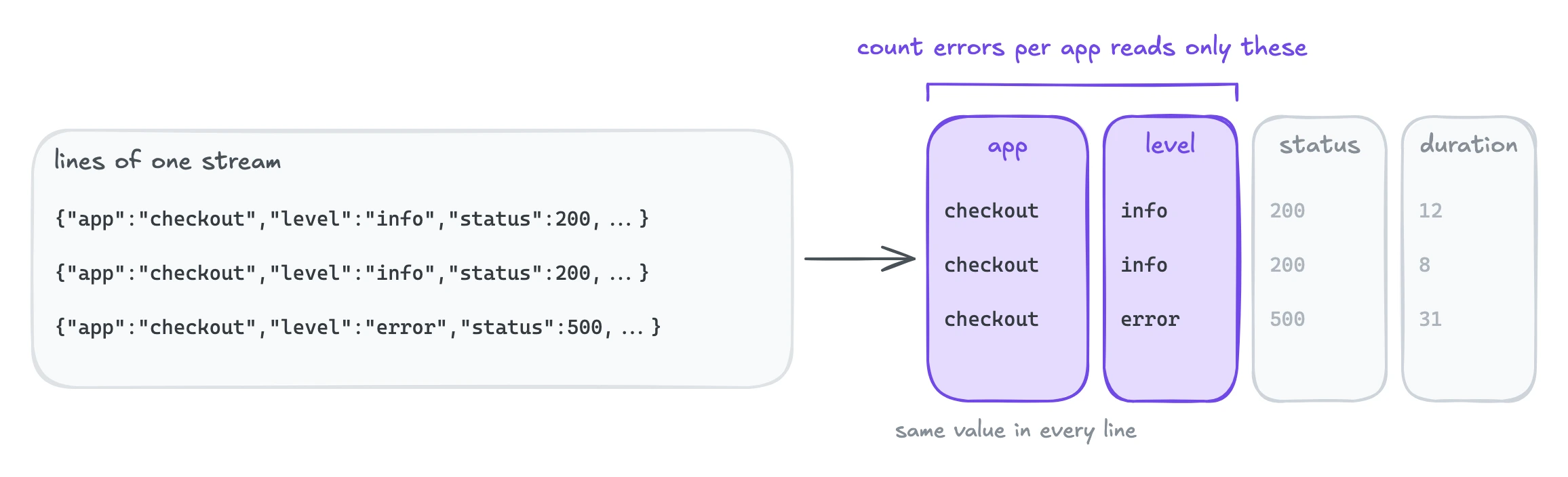 How VictoriaLogs stores the lines of a stream.
Storing logs this way already makes VictoriaLogs compact on disk and fast at aggregations, so it only builds light indexes and a little metadata at ingestion. This is why it ingested 120k lines/s, 2.5x more than Elasticsearch, while using 4.7x less disk. Only Loki ingested faster, as we saw above. For the details, see how VictoriaLogs stores your logs.
On the query side, VictoriaLogs answered every query within seconds, and it was faster than Loki on all of them. Against Elasticsearch, the results were mixed, and we will look closer in our post on queries. VictoriaLogs does not build a full inverted index, to keep ingestion and storage cheap. The trade-off is that searching for a common word, one that appears in many lines, is slower. A rare word, such as a user ID, is still fast to find, because its bloom filters let it skip the data that cannot contain that word.
VictoriaLogs also uses much less memory. At 40k lines/s, Loki used about 14x more (11.4 against 0.8 GiB), and at 120k lines/s about 5x more (12.8 against 2.5 GiB). This free memory is not wasted. The operating system uses it to cache data that was recently written or read, so many queries, especially over recent logs, read from memory instead of disk. It also leaves room for many queries at the same time, which we plan to test in a later post on queries.
To be fair, this benchmark uses structured logs, which play to the strengths of VictoriaLogs. Much of the daily work on such logs is also aggregation for dashboards, alerts and analysis, which is where columns help most. If your logs are unstructured, such as the plain-text logs of older applications and network devices, VictoriaLogs still ingests and searches them well, but you gain less than with structured logs.
SigNoz and ClickStack
#
SigNoz and ClickStack surprised us more than Loki did. Both store logs in ClickHouse, a columnar database like VictoriaLogs, so we expected them to be close to VictoriaLogs. They were not. ClickStack reached 46k lines/s and SigNoz only 10k, against 120k for VictoriaLogs. In disk space, ClickStack came second, but it still needed 82 MiB per million lines, 1.5x more than VictoriaLogs.
The lower ingestion rate comes from the collector that both stacks need in front of ClickHouse. ClickHouse is a general-purpose database and cannot receive logs in their usual formats, so an OpenTelemetry collector has to turn them into rows first. That collector used more CPU than ClickHouse itself. In SigNoz at 10k lines/s, it used 2.7 cores against 1.5 for ClickHouse, and in ClickStack at its maximum rate, 3.3 against 2.2.
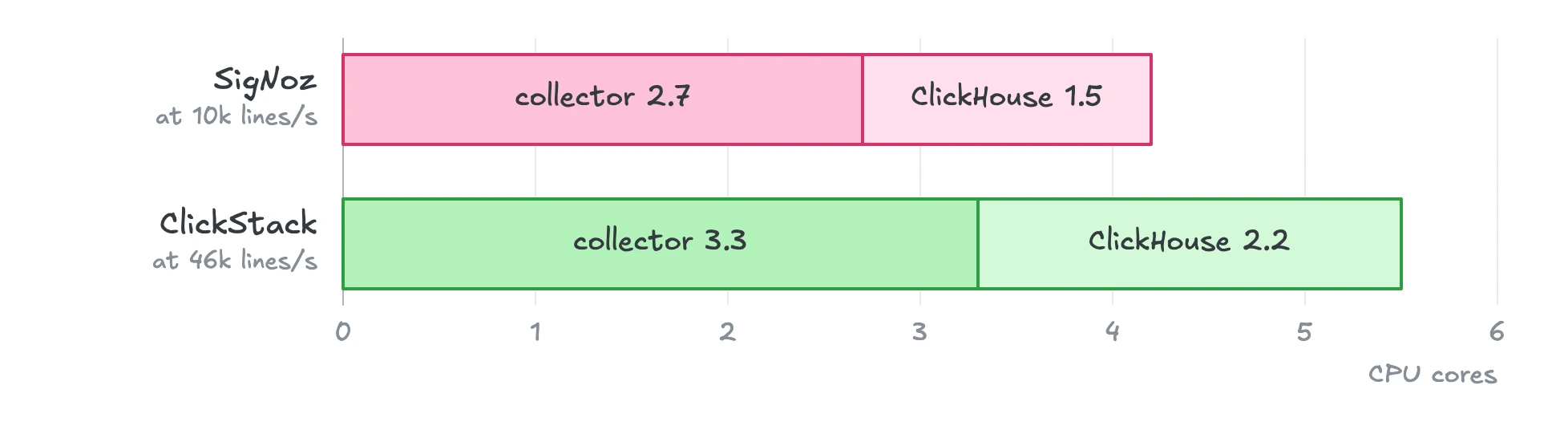 CPU of the collector and of ClickHouse in each stack.
The larger disk size likely comes from how both stacks store the fields. They store logs in a ClickHouse table with fixed columns, but the OpenTelemetry log format has a few fixed fields, plus attributes that can hold any custom data. The fixed fields, such as Timestamp, SeverityText and TraceId, get columns of their own, which compress well. The attributes go into a few Map columns, where the values of many fields are mixed together, so they compress less well and are slower to query.
VictoriaLogs is inspired by ClickHouse, but it is built only for logs (FAQ). It differs from ClickHouse in 2 ways that likely explain much of the gap in ingestion rate and disk space.
- No collector. VictoriaLogs receives logs directly in the formats that log shippers already send, such as OpenTelemetry, Loki, Elasticsearch, Datadog and Splunk.
- No schema. Every field of a line gets its own column, not only the few fixed fields.
In this test, SigNoz used almost 5x more CPU than ClickStack on the same design, mostly in its collector. The collector spends this CPU on extra metadata that speeds up queries and helps its UI, a trade-off that we will look at in our post on queries. It also ships without a memory limit, and we kept that default. So when it fell behind, it kept the lines in memory until Kubernetes killed it. Other users have reported similar crashes of the collector (GitHub issue).
To be fair, SigNoz and ClickStack are full observability stacks that bring logs, metrics and traces into one place and link each trace to its logs. This test measured only one part of them, log ingestion. Both stacks also recommend adding more collectors as the volume grows. ClickHouse’s docs size one collector at about 60k events/s for 3 cores (ClickHouse docs), and SigNoz’s own benchmark ran 3 collectors next to ClickHouse to reach about 55k lines/s on a 16-core machine (SigNoz). In our test, every system got one 8-core machine, to be fair to all of them, so the collector had to share it with ClickHouse. A cluster test, where each part can scale on its own, would show how much they gain from a larger fleet, and it is in our plans.
Key Takeaways
#
Each system made a different trade-off, based on what it puts first and how it is built.
- Loki ingested the most, because it indexes the least. It pays for this with slow queries, unless you pay for more cores to make them faster.
- Elasticsearch and OpenSearch index every word of every line. This lets them find words and exact values very fast. But you pay for it with high CPU at ingestion and a lot of storage.
- SigNoz and ClickStack store logs in ClickHouse. ClickHouse is not built only for logs, so both stacks need additional components, which slow down ingestion and add to the cost. They suit you if you want your OTLP logs, metrics and traces in one place.
- VictoriaLogs is inspired by ClickHouse, but it is built directly for logs. It makes use of modern structured logs to ingest fast, answer queries within seconds and cost the least in memory and disk. You gain less if your logs are plain text.
This post tested structured logs on one machine with regular cloud disks. In later posts, we plan to cover queries in depth, cluster mode, and object storage once VictoriaLogs supports it.
You can reproduce the main ingestion results with our benchmark repository, and try VictoriaLogs with the quick start guide. If you find a mistake in our setup, or know how to tune one of the systems better, open an issue in the repository or reach out on VictoriaMetrics’ Slack.
Leave a comment below or Contact Us if you have any questions!
comments powered by Disqus
You might also like:
VictoriaMetrics March 2026 Ecosystem Updates
March 2026 VictoriaMetrics Stack releases deliver Grafana Cardinality Explorer, VMUI pagination, JWT auth enhancements, log UI sidebar, and Kubernetes log enrichment for scalable observability. Upgrade now for better UI usability, query performance, and production-ready monitoring workflows.
Benchmarking Kubernetes Log Collectors: vlagent, Vector, Fluent Bit, OpenTelemetry Collector, and more
We benchmarked vlagent, Vector, Fluent Bit, Filebeat, Fluentd, Promtail, Grafana Alloy, and OpenTelemetry Collector on throughput, resource usage, and delivery correctness - and found correctness issues that most benchmarks overlook.
VictoriaMetrics February 2026 Ecosystem Updates
February 2026 updates deliver new LTS support, VMUI memory insights, queue alerts, jsonline output, resizable Web UI tables, and automatic snapshot expiry across the VictoriaMetrics Observability Stack.