- Blog /
- How Linux readahead works, and the two ways to change it
How Linux readahead works, and the two ways to change it
Share:


Most of the time, when we read a file, we do not think much about what happens underneath. You ask for some bytes, you get some bytes. But when getting data off the disk efficiently is at the core of what your application does, what happens underneath starts to matter a great deal, and two identical read() calls can differ enormously in what they cost.
So in this post we are going to look at one of the Linux kernel’s optimizations for reading files: readahead. The quickest way to see what it is worth is to start with the problem it solves, so here is a program reading a file one page at a time on a kernel where readahead has been switched off entirely.
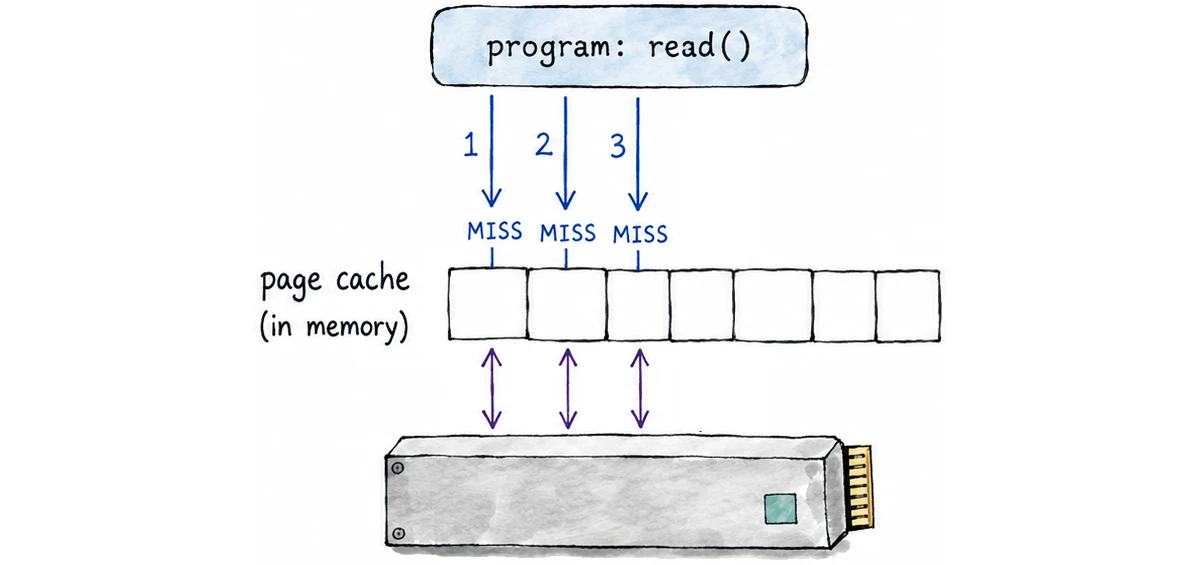
When you read a file on Linux you normally do not read it from the disk, you read it from the page cache: the kernel’s own in-memory copy of file data, indexed by file and offset. That is the row of squares in the middle of the picture, one square per page. Every read() looks there first. If the page it wants is already in that row, the read is a copy from one bit of memory to another and it is over in nanoseconds. If it is not, that is a miss, and the kernel goes down to the device, reads the data, puts it in the cache, and only then hands it to you from there.
In the picture none of the pages are in the cache yet, which is why all three reads are labelled MISS and each of them makes its own trip to the device and back, with your thread asleep until the data arrives. On a fast NVMe drive that trip costs microseconds. On a mechanical disk, where an arm physically has to move, it can be milliseconds. Same call, same 4 KiB handed back, and orders of magnitude between them depending on whether somebody had to go and fetch it.
A note on pages and folios
Throughout this article I say “page”, because it is the easiest way to follow what is going on. The unit Linux actually manages here is the folio: one page, or several physically contiguous pages handled as a single object.
Now multiply the picture. Reading a 256 MiB file in 4 KiB pages is not three reads, it is 65,536 of them. If they all hit the cache, the whole file goes past in a few tens of milliseconds. If every single one has to stop and ask the device, you are waiting seconds instead.
And the trouble is not really that any one round trip is slow, it is that you are buying 65,536 of them. Most of what a round trip costs is fixed (the request gets built, submitted, queued, answered and completed whether it asks for 4 KiB or for far more), so asking in bigger pieces gets you dramatically more data out of a single round trip. And devices are much better at reading big contiguous chunks than at chasing small reads scattered around, so asking for larger blocks is simply a friendlier workload for them.
Which is why switching readahead off is rarely a good idea. Left to itself, the kernel does the obvious thing: it stops waiting to be asked.
Readahead
#
Same program, same file, same disk. The only thing that changes is what the kernel does about that first miss.
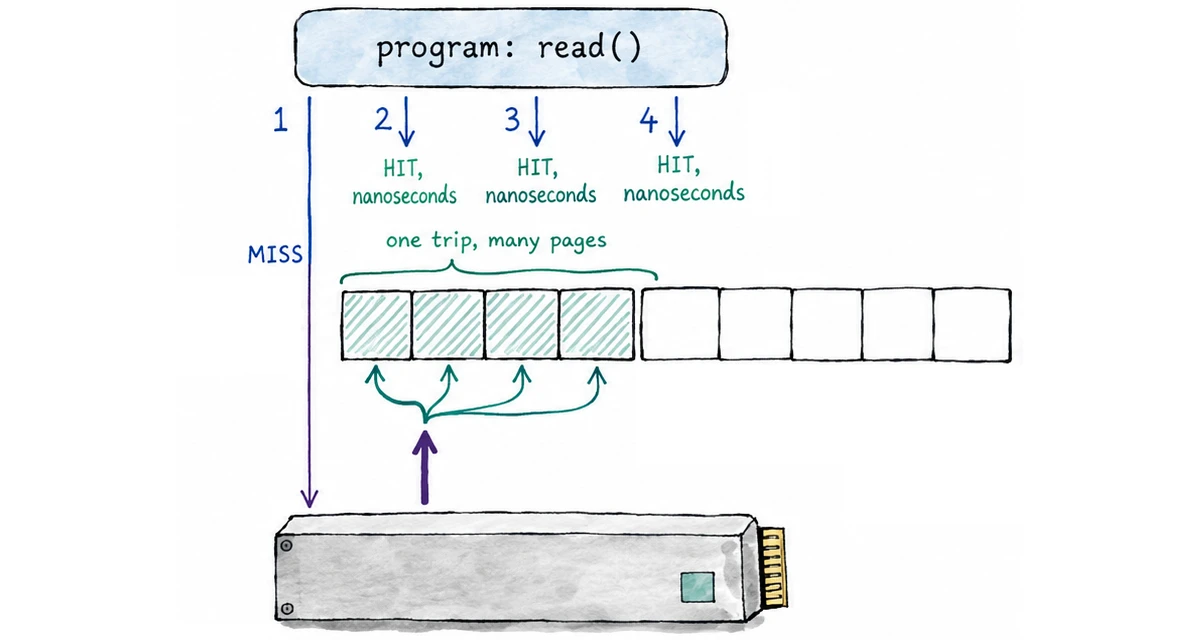
Read 1 still misses, and still pays for the trip. But this time the kernel does not come back with only the page that was asked for; it comes back with that page and a run of the pages that follow it. The program was going to wait for the device anyway, and most of what the trip costs is fixed, so collecting the neighbours on the way is cheap.
That is readahead: pulling content into the page cache before the application explicitly asks for it, on the bet that a program which just read pages N and N+1 is about to want N+2. When the bet pays off, reads 2, 3 and 4 never reach the disk at all. They find their pages already sitting there, and cost nanoseconds instead of microseconds.
Nothing has to announce that this is going to happen, though. Your program does not have to declare that it is about to read a file sequentially; by default the kernel just works it out by watching where your reads land. There are two moments where it does that watching.
The first is the one in the picture: a read misses, and the kernel takes the opportunity to fetch what comes after it.
The second is subtler, and it is the part that keeps readahead going. When the kernel fetches a batch of pages, it does not just drop them in the cache and forget about them. It picks one page out of the batch and sets a flag on it (a marker). Later, when some read finds that page in the cache, the flag acts as a note the kernel left for itself: this reader is still going, time to fetch the next batch.
The interesting bit is where the marker goes. Let’s simplify and say it always goes on the first page of a batch, keeping in mind that the real position is worked out by the kernel and is not always exactly that (mm/readahead.c:475).
The first fetch is the odd one out: you asked for page N, the kernel brings in a small batch around it (say pages N to N+3), and the marker goes on N+1, the page right after the one you asked for. Read that next page and you have shown that you are moving forward, which is enough for the kernel to fetch a batch ahead of you and put a marker on the first page of that new batch. Read into that batch, trip that marker, and the same thing happens again: reaching the batch at all means it was worth fetching, so the kernel fetches the next one in the background and marks its first page too. None of those reads waits for the fetch it sets off; they get their data and return immediately.
Putting the marker early is the whole trick. When the reader trips it, it still has essentially the whole batch in front of it, and that is exactly the breathing room the device needs to deliver the next batch before anyone asks for it. In the ideal scenario the reader never catches up with the fetching: after the very first miss, the program stops blocking on the disk altogether and the data simply keeps showing up in front of it.
Let’s see how that looks over a few rounds of readahead.

Each round is bigger than the last. The kernel starts cautiously, then grows the batch every time a marker gets tripped and the reader proves it is still going. Every batch carries its own marker, always with pages to spare after it.
The catch is that all of this is guesswork, and guessing costs something. Pages that get fetched and never used burn device bandwidth and waste page cache. And obviously the growing cannot go on forever, so we are about to see what stops it.
Setting boundaries: read_ahead_kb
#
Something has to decide how far ahead is far enough, and on Linux that something is a single number you are allowed to change.
read_ahead_kb is the size limit on one of those batches (how far past your current position the kernel is allowed to reach on any one round).
The value lives in sysfs, one per disk:
$ cat /sys/block/nvme0n1/queue/read_ahead_kb
512
So on this machine nvme0n1 allows at most 512 KiB of readahead, and that allowance is per open file. The growth we watched earlier runs straight into it: the batches grow until one of them reaches 512 KiB, and every batch after that is 512 KiB.
Another interesting effect is that this same number decides how fast the batches grow, and the factor is not always the same (mm/readahead.c:399):
	if (cur < max / 16)
		return 4 * cur;
	if (cur <= max / 2)
		return 2 * cur;
	return max;
max is the ceiling, cur the size of the last batch. Below a sixteenth of the ceiling the batch grows 4x, up to half of it 2x, and after that it jumps to the ceiling.
The file is writable, so the ceiling is yours to move. As root:
$ echo 128 > /sys/block/nvme0n1/queue/read_ahead_kb
That takes effect immediately for files opened from then on, but it does not survive a reboot: to make it permanent you need a udev rule matching the device, or whatever your distribution uses for block device tuning.
So what does moving it actually buy you? Take the same sequential reader on a device capped at 128 and on one capped at 512, and three things follow.
The reader gets more runway. In the steady state there is up to four times as much data sitting in front of the reader, already fetched or already in flight. With 128 KiB batches, a reader that consumes quickly can catch up with the fetching and go back to waiting on the disk; with 512 KiB it has four times as far to travel before that happens.
The device gets fewer, larger jobs. Streaming a 256 MiB file takes 2048 readahead rounds at 128 KiB and 512 rounds at 512 KiB. Fewer rounds means fewer trips through the submission path and more data queued per trip, which is what lets an SSD keep several requests usefully in flight rather than being fed one small one at a time.
And a bad guess costs four times as much. If the reader stops early, or seeks somewhere else entirely, the pages already fetched are wasted twice over (bandwidth spent to get them, and page cache occupied by data nobody wants). At 128 KiB you can throw away 128 KiB per round. At 512 KiB you can throw away 512 KiB.
That is the actual trade, and it is why there is no value that is simply correct. A big ceiling is a bet that reads are sequential, paid for in wasted I/O when they are not.
A device-wide limit is useful, and the kernel’s guessing is good, but sometimes I already know exactly what I am going to do with a file, so let’s see how to tell the kernel instead of leaving it to guess.
Giving advice to the kernel
#
read_ahead_kb is a setting on a device, and it applies to every process reading from that device. The other way to influence readahead is from inside a single program, about a single file, and that is what the advice calls are for.
The idea is straightforward: the program usually knows what the kernel is busy trying to deduce. A log shipper knows it is going to stream a file from start to finish. A database knows its index lookups will land all over the place. A compaction job knows it will never look at this data again once it has written the output. Instead of leaving the kernel to work any of that out from a trail of cache misses, the program says it outright:
posix_fadvise(fd, offset, len, POSIX_FADV_SEQUENTIAL);
posix_fadvise() names a file descriptor, a byte range within that file, and one piece of advice about how the program intends to use it. The advice values are spelled POSIX_FADV_NORMAL, POSIX_FADV_SEQUENTIAL and so on; I will drop the prefix from here on and just call them NORMAL, SEQUENTIAL and the rest.
There are six advice values in total, and their names make them sound rather more commanding than they are. They are hints. Here is the whole vocabulary, and what each one actually does (mm/fadvise.c:31):
| advice | value | what it actually does |
|---|---|---|
NORMAL | 0 | back to defaults: the open file’s ceiling returns to the device’s read_ahead_kb, and random and no-reuse mode are switched off |
RANDOM | 1 | enables random access mode, which stops the kernel reading ahead at all |
SEQUENTIAL | 2 | sets the open file’s ceiling to twice the device’s read_ahead_kb |
WILLNEED | 3 | readahead over the range, capped as described below |
DONTNEED | 4 | starts writeback and drops the clean pages in the range |
NOREUSE | 5 | enables no-reuse mode |
It is important to understand that NORMAL, RANDOM, SEQUENTIAL and NOREUSE ignore the offset and len you pass entirely; they are properties of the open file description behind the descriptor, not of a range. Only WILLNEED and DONTNEED care about the range.
That is the whole vocabulary, but a one-line summary cannot show how much each of these is hiding. The gap between what the name promises and what the code actually does is where nearly all of the surprises live, so the rest of the article takes them one at a time, starting with the simplest.
NORMAL
#
NORMAL is the default, and it is the behaviour we have been describing all along: the kernel watching where the reads land, growing the batch, planting markers. Every open file description starts out like this without anyone having to ask. So passing NORMAL to posix_fadvise() is not really asking for anything, it is asking to go back; it only means something if you have already changed that open file description with one of the other advices (mm/fadvise.c:79).
Which means the interesting ones are the other five. Let’s start with the one that tells the kernel to stop guessing altogether.
RANDOM
#
Readahead is a good bet most of the time, but sometimes you know in advance that it is going to lose. A database doing pread() lookups through an index jumps all over its file; a program pulling scattered records out of a large archive does the same. When the reads really are spread about like that, every page the kernel fetches speculatively is a page nobody will ever ask for (bandwidth spent for nothing, and page cache filled with data that was never wanted).
RANDOM is how a program says so. It sets FMODE_RANDOM on the open file description, which tells the kernel to fetch exactly what was asked for and not a page more.
That flag is only consulted on the read() path, though. Faults on an mmap()ed file never look at it, and the equivalent there is madvise(MADV_RANDOM).
That is one end of the scale. At the other end is the case where you know perfectly well that you are going to read the whole thing, start to finish.
SEQUENTIAL
#
Readahead is already all about sequential reads, so why would anyone ever need to say SEQUENTIAL?
Because read_ahead_kb belongs to the device, not to you. It has to strike a balance for everything running against that disk (readers that stream, readers that seek, readers that do a bit of both), which makes it deliberately cautious. When a particular program knows perfectly well that it is going to walk a file from one end to the other, that caution is costing it. SEQUENTIAL is how it says so, and the kernel’s answer is simply to double its allowance for that one open file (mm/fadvise.c:90):
	case POSIX_FADV_SEQUENTIAL:
		file->f_ra.ra_pages = bdi->ra_pages * 2;
Those three (NORMAL, RANDOM and SEQUENTIAL) all do the same kind of thing: they set the terms and let the kernel carry on guessing within them. The next two are different. They ignore the guessing entirely and act on a range of the file, there and then.
WILLNEED
#
The three so far change how the kernel will behave from now on. WILLNEED asks for something to happen right away: you name a range of the file, and the kernel starts fetching it, so that if the prefetch gets far enough ahead the pages may already be in the cache by the time you read them. Prefetching on your terms instead of the kernel’s guesswork.
There is a catch, though. The length you pass is not the length you get. Before doing anything, the kernel quietly shrinks your range to a single window: whichever is larger, the file’s readahead ceiling (read_ahead_kb, or twice that if SEQUENTIAL has already doubled it) or the block device’s maximum I/O size (max_sectors_kb, capped at 4 MiB by default). Ask it to prefetch a 256 MiB file in one go and you will get a few megabytes of it. The call returns success, and nothing anywhere tells you the rest was dropped on the floor.
One last thing. WILLNEED plants no marker. It issues that one fetch and stops, so it never chains into the next round the way an ordinary sequential read does. It is a one-shot fetch, not a way of starting the machinery off.
DONTNEED
#
DONTNEED is the mirror image of WILLNEED. You pulled a range of a file into memory, you are done with it, so you advise DONTNEED and the kernel drops those pages and gets the memory back for something else.
That works, but be careful, because it only works for pages that are clean. The kernel will not discard a page that is still dirty; the data has not reached the disk yet, so throwing the page away would lose it. So if you write a large file and call DONTNEED over it, many of those pages are probably still dirty, and they stay in the cache. The call does start writeback on the dirty pages it finds, but it does not wait for that writeback to finish, so by the time it returns those pages are still there. Nothing failed, nothing was reported, and much less was freed than you asked for.
The fix is simple: fsync() or fdatasync() first, then DONTNEED. Clean the pages, then ask for them to go.
That is data you have already finished with. The last advice is about data you know in advance you are only going to look at once.
NOREUSE
#
Sometimes you know you will read something exactly once (a backup walking every file on the disk, a video encoder streaming through a huge input), and you would rather that data did not push everything else out of memory on the way past. NOREUSE is how you say so, with a caveat large enough that it disqualifies most of the obvious use cases.
It throws nothing away. All it does is set FMODE_NOREUSE on the open file. From then on, for mapped access, those references stop being treated as evidence that the page should be kept hot. The pages remain cacheable and reusable; NOREUSE simply makes them easier for reclaim to discard.
The caveat is that “mapped access” is the important part. read() never looks at the flag. It is advice for mmap() readers; if you want a streaming read() not to trash the cache, you are back to DONTNEED behind your own read window.
That covers the whole vocabulary of advice. Before wrapping up, let’s go back to the device for a moment, because read_ahead_kb is easy to credit with more than it actually does.
What read_ahead_kb does not control
#
It is tempting to assume that turning read_ahead_kb up means the device starts getting bigger reads. It does not, and it is worth seeing why.
There are three separate things going on here, and read_ahead_kb is only the first of them. It decides how much the page cache speculatively pulls in on each round, and that is the whole of its remit. How large the resulting requests actually are is decided by max_sectors_kb, the biggest single request the block layer will build; a 2 MiB batch on a device that caps requests at 1 MiB simply comes out as two requests. And nr_requests limits request allocation in the block layer; the actual number of requests the device can have outstanding also depends on blk-mq queue and tag configuration and on the device itself.
So raising read_ahead_kb does not buy you larger I/Os. It buys you more of them, queueing against the same budget as everything else on the device.
Summary
#
That was a fair amount of ground, so here is the shape of it again. Reading a file is really a page cache lookup, and the whole game is avoiding the trip to the device. Readahead plays that game by grabbing a run of pages whenever you miss, marking one of them so that reaching it quietly kicks off the next run, and making each run bigger for as long as the guessing keeps paying off.
read_ahead_kb is where the growing stops. It is a ceiling rather than a fixed amount, it belongs to the device, and every open file takes its own copy of it.
And when you already know better than the kernel does, posix_fadvise() lets you say so: SEQUENTIAL to ask for more, RANDOM to ask for none, WILLNEED to fetch a range now, DONTNEED to drop one, NOREUSE to make what you map easier to reclaim, NORMAL to put everything back. Just remember they are hints, and most of them do rather less than their names promise.
Who We Are
#
If you want to monitor your services, track metrics, and see how everything performs, you might want to check out VictoriaMetrics. It’s a fast, open-source, and cost-saving way to keep an eye on your infrastructure.
And we are engineers who enjoy taking things apart to see how they actually work (kernels, databases, runtimes, storage engines) and writing up what we find. If you spot anything here that is wrong or out of date, or you just want to argue about page cache behaviour, the comments below are open.
Leave a comment below or Contact Us if you have any questions!
comments powered by Disqus
You might also like:

Announcing vmestimator: Real-time Cardinality Estimations for VictoriaMetrics and Prometheus
vmestimator is a new open-source tool that estimates metric cardinality in real time. It can alert to high-cardinality spikes before they slow queries and increase resource usage. Works with any Prometheus-compatible setups, Grafana, and vmalert

How Airbnb Built a High-Volume Metrics Pipeline with OpenTelemetry and vmagent
Learn how Airbnb rebuilt its observability pipeline with OpenTelemetry and vmagent to handle over 100 million samples per second, reduce cost by 10x, and simplify high-scale metrics aggregation.

VictoriaMetrics at KubeCon: Optimizing Tail Sampling in OpenTelemetry with Retroactive Sampling
If you’ve been struggling with the high resource overhead of tail sampling, check out retroactive sampling, an approach that significantly reduces sampling overhead for distributed tracing in OpenTelemetry.