- Blog /
- Latest updates about backup components of VictoriaMetrics
Latest updates about backup components of VictoriaMetrics
Share:


VictoriaMetrics is proud to announce that we consider vmbackup and vmbackupmanager to be feature-complete solutions as of release 1.85.3. These backup components are essential for ensuring the safety and integrity of your data, and we have made a number of improvements in recent releases to make them even more reliable and user-friendly.
Some key updates in the last few releases include:
- Support for Azure Blob Storage, added in 1.82.0
- Enhanced automation for Kubernetes and CLI mode, introduced in 1.83.0
- Improved observability and the release of an official metrics dashboard in 1.85.3
We hope these updates will help you make the most of these powerful backup solutions and keep your data safe and secure.
Support of Azure Blob Storage
#
Supporting Azure Blob Storage was a final piece to support all 3 major cloud providers. Azure storage backend is available for both vmbackup and vmbackupmanager.
In order to use newly supported storage backend provide credentials and URL for backup location in form azblob://<container>/<path/to/backup>.
Credentials for Azure Blob must be provided as environment variables. You can either use AZURE_STORAGE_ACCOUNT_NAME and AZURE_STORAGE_ACCOUNT_KEY, or AZURE_STORAGE_ACCOUNT_CONNECTION_STRING.
vmbackupmanager simplifies and streamlines the process of regularly creating backups. It runs as a separate service alongside the single-node or vmstorage node of a cluster setup, and uses command-line flags to define the types of backups to be created and retention policies to be applied.
vmbackupmanager also employs a smart upload strategy to save bandwidth when creating multiple backups. This is achieved by first uploading changed partitions to the latest backup, and then using server-side copy to create a full backup from already-uploaded partitions.
Improved Kubernetes automation for vmbackupmanager
#
Previously, vmbackupmanager was only responsible for creating backups. In order to restore from the backup, it was required to use vmrestore with its own configuration flags (even though they’re similar). Starting from 1.83.0 it is possible to use vmbackupmanager for full backup lifecycle.
Before this feature was added, in order to restore backup data in k8s it was required to do a quite complex and error-prone process which required:
- To scale down existing storage nodes
- To attach PVCs to pods with vmrestore and perform restore
- Scale storage nodes to previous state
Or an easier option such as:
- To add vmrestore as an init container (this step triggers pods restart and restores the data)
- To remove init container (otherwise after pod restart vmrestore will restore backup again)
In order to improve this process we have added CLI mode for vmbackupmanager which will allow:
- To see all backups available for restore at the current storage node
- To configure which backup should be restored on the next pod restart
Now in order to restore from the backup, assuming vmbackupmanager is already used for creating the backup, follow the procedure below:
- Add an init container for vmstorage or single-node pod.
- For the VM Operator you just need to add the following:
vmBackup: restore: onStart: enabled: true - For official Helm charts users:
vmbackupmanager:
  restore:
    onStart:
      enabled: true
- For the VM Operator you just need to add the following:
- Exec into the pod
- Run
/vmbackupmanager backup listand pick a backup you need to restore$ /vmbackupmanager backup list ["daily/2022-10-06","daily/2022-10-10","hourly/2022-10-04:13","hourly/2022-10-06:12","hourly/2022-10-06:13","hourly/2022-10-10:14","hourly/2022-10-10:16","monthly/2022-10","weekly/2022-40","weekly/2022-41"] - Run
/vmbackupmanager restore create {backup_name}$ /vmbackupmanager restore create daily/2022-10-10 - Restart pod
The whole process now seems much easier and less error-prone.
By using CLI it is also easy to restore backup into a separate cluster, read more about this in our documentation.
But that’s not all - the CLI commands for vmbackupmanager actually use the vmbackupmanager API to perform operations. This means that you can use the vmbackupmanager APIs to build custom workflows for more specialized use cases. You can find more info about using API here.
Improved observability
#
The last step was to add better observability for the backup process. Release 1.85.3 added metrics that made it possible to get more information about vmbackupmanager status. Having new data in place allowed us to build an official dashboard for vmbackupmanager. You can find it on Grafana website and Github.
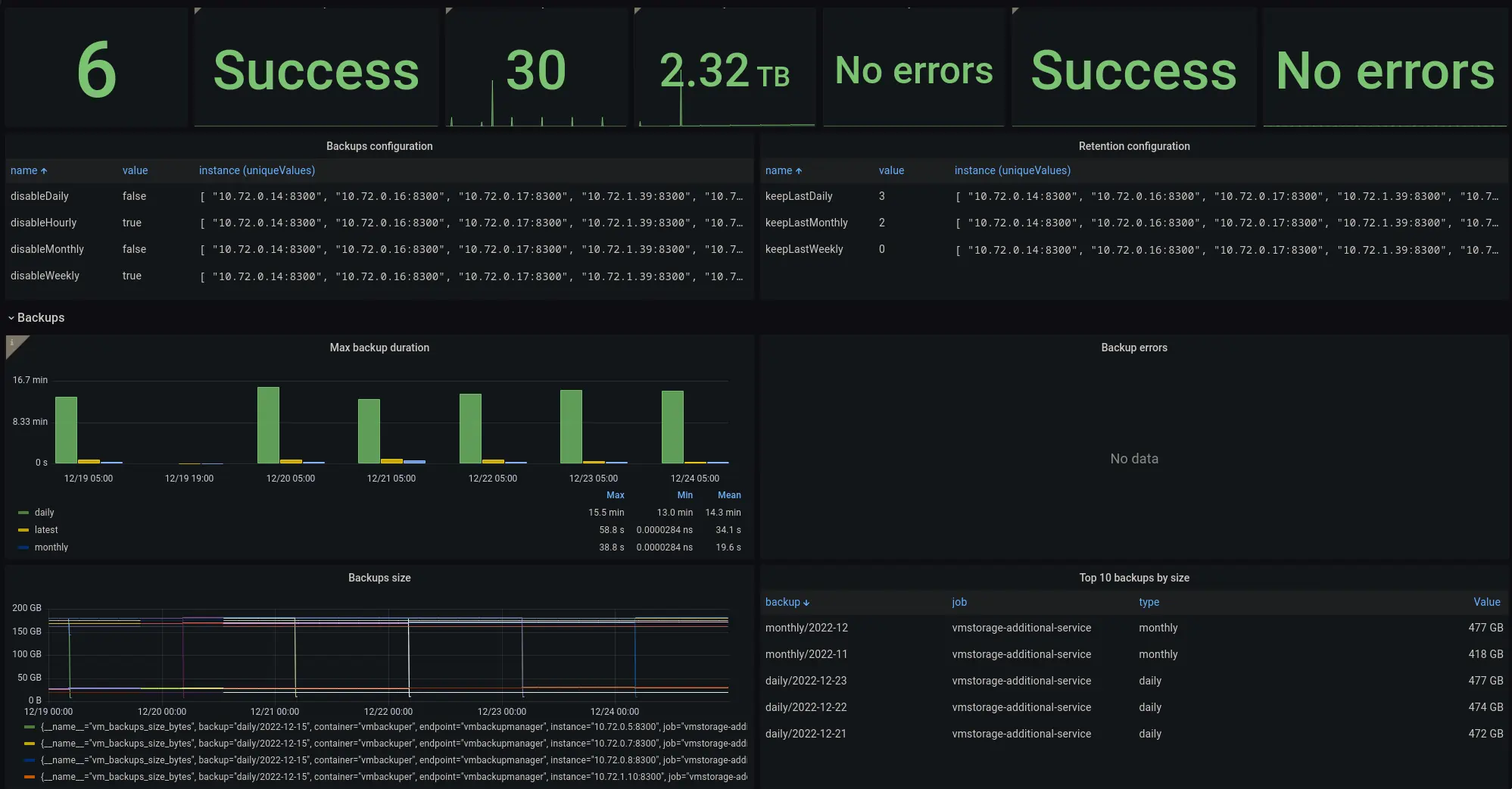 Grafana dashboard for vmbackupmanager
Make sure to configure monitoring of vmbackupmanager to see the status of backups.
Leave a comment below or Contact Us if you have any questions!
comments powered by Disqus