- Blog /
- VictoriaLogs in VictoriaMetrics Cloud: Fast, Cost-Effective Log Management is Here
VictoriaLogs in VictoriaMetrics Cloud: Fast, Cost-Effective Log Management is Here
Share:


Yes, you got it right: VictoriaLogs is now Generally Available in VictoriaMetrics Cloud!
We believe that this is a huge milestone in our journey to deliver what our users are expecting from us: a complete, managed observability solution.
If you’ve been following our quarterly updates, you know we’ve been after this launch for a while. In our latest update a few weeks ago we already announced that we were ready and today we’re making it official.
You may have a lot of questions, and we believe the best way to answer them is to try it out by signing up for a one-month free trial without needing to add a credit card.
Alternatively, you may also contact us for more info or… Just keep reading!
What’s in the box?
#
Plain and simple: VictoriaLogs at a couple of clicks away. If you didn’t know it already, you’ll actually find that VictoriaLogs is built with the same philosophy that made VictoriaMetrics so popular: performance, cost efficiency and ease of use. In VictoriaMetrics Cloud, we like to go one step further and give you the option to deploy and use it within seconds in a fully managed environment, while we take care of upgrades, the infra, backups and all those boring duties so you can focus on what matters.
Exploring Logs
#
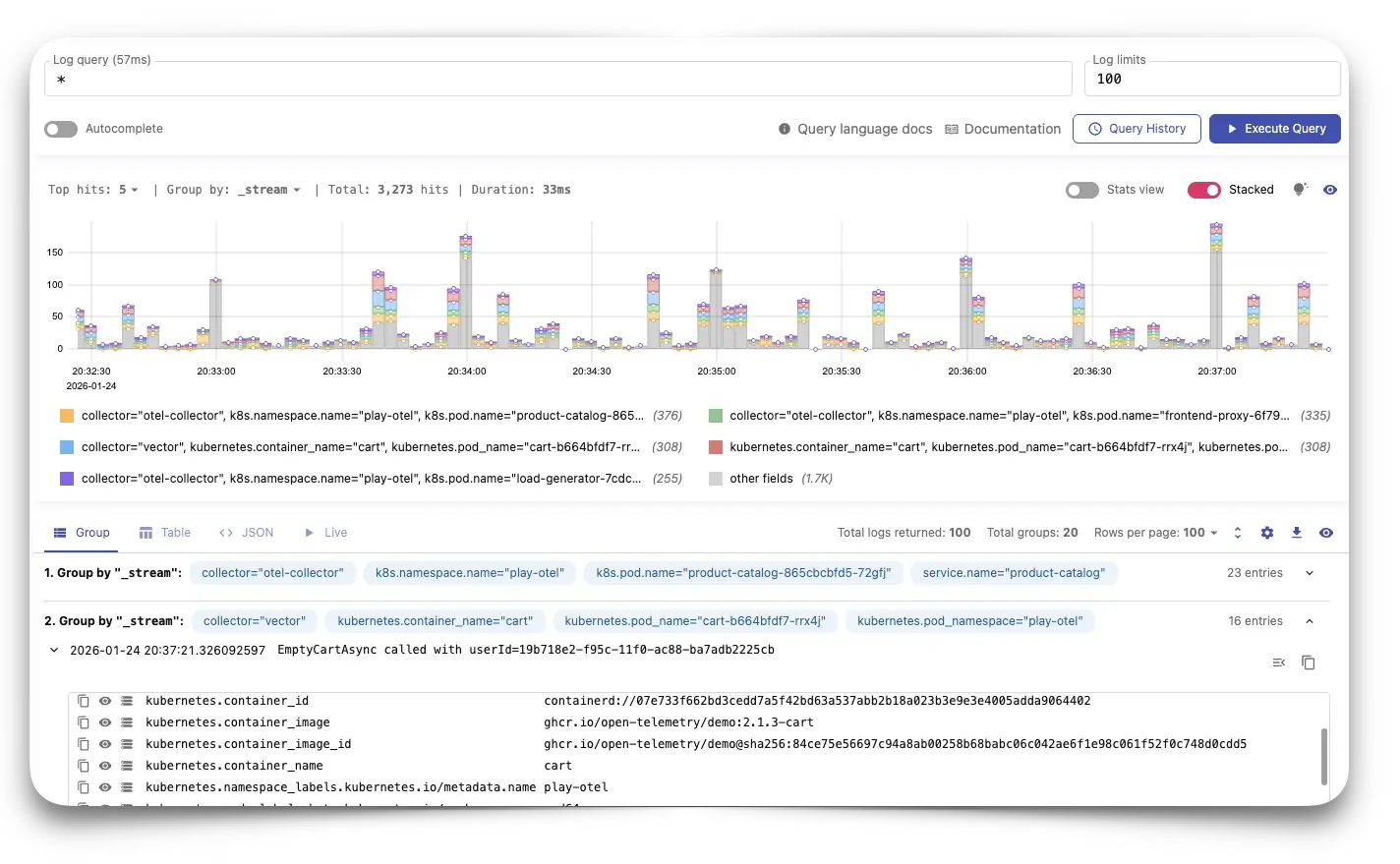
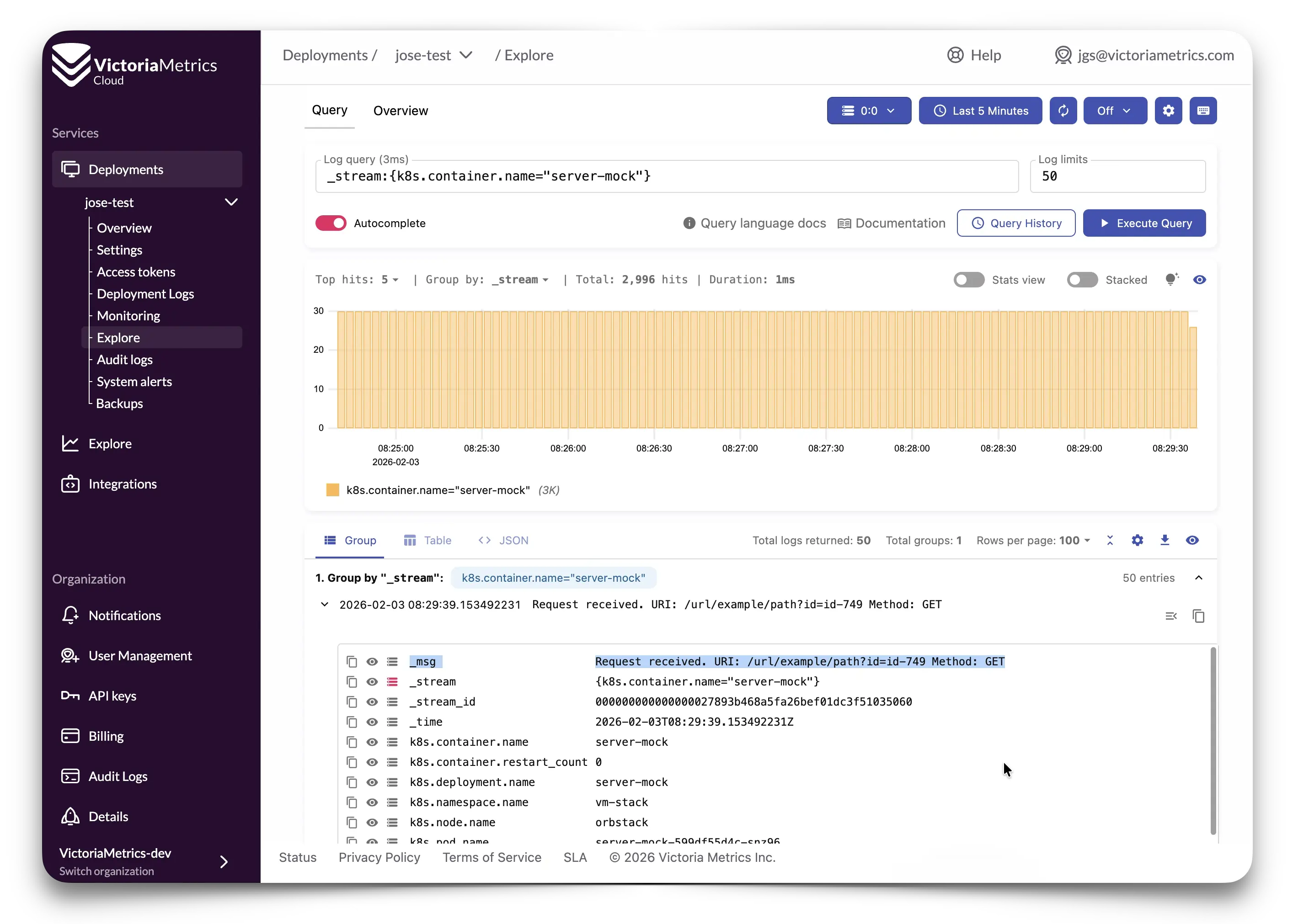
Once your VictoriaLogs deployment is up and running, exploring your logs is easy. In the Explore section you’ll find everything you need to understand your logs at a glance: visualize log distribution over time, group logs by streams, and spot noisy or weird fields instantly.
And the best part? The UI helps you every step of the way with autocomplete suggestions and query prettification, making complex queries easy to build and understand. Your query history is automatically saved, including favorites, so you can quickly return to the queries that matter most (or that one that clicked but you just can’t remember now).
At a glance
#
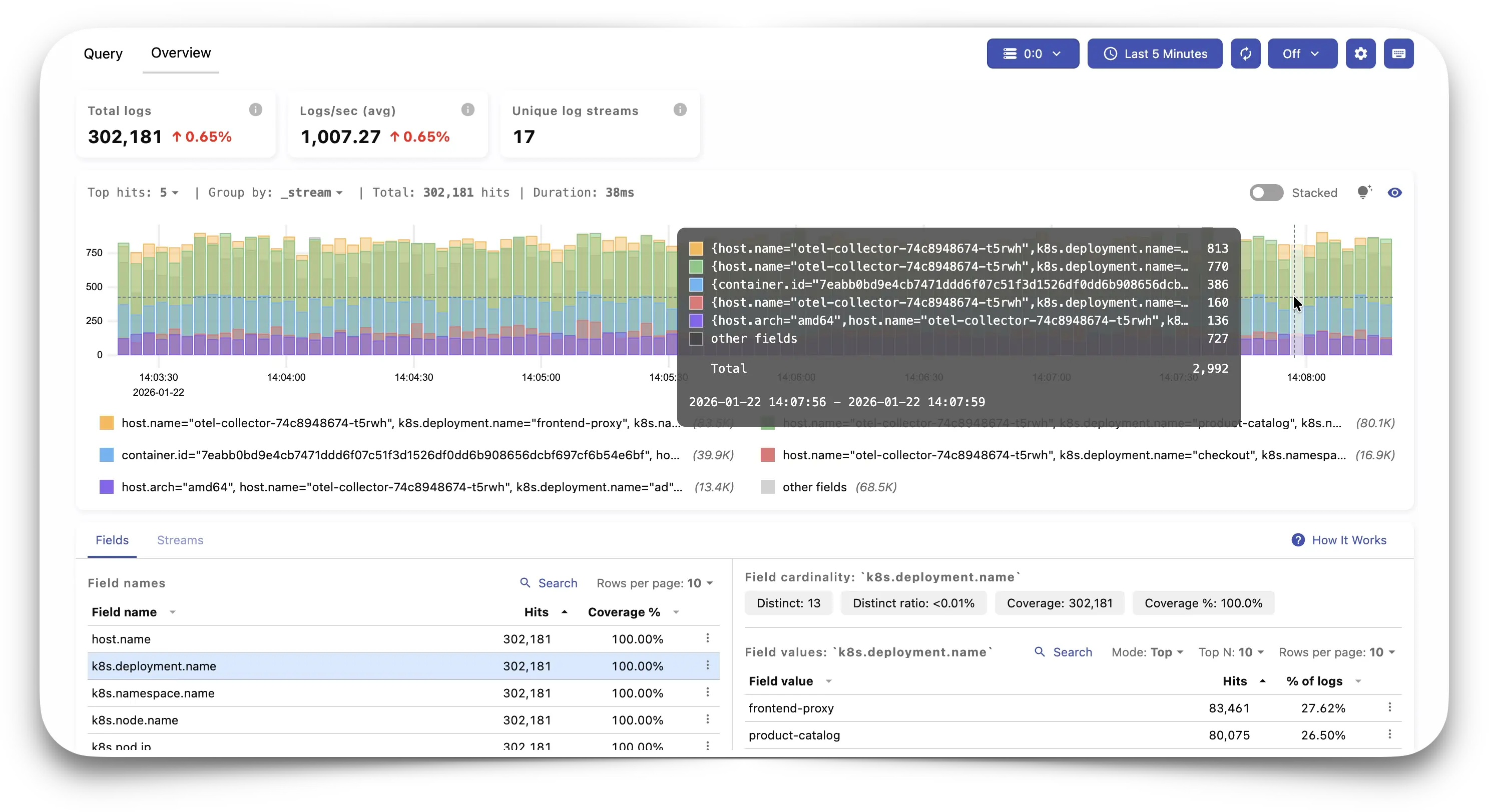
The Overview page provides a bird’s-eye view of your logging data, displaying statistics about
total logs, rates, and cardinality. The Names and Values tables let you drill down into field
names and their values, helping you identify patterns and outliers quickly. Clicking on any name or
value automatically filters your view, making exploratory analysis feel natural and snappy.
LogsQL
#
Querying VictoriaLogs is powered by the LogsQL language, designed specifically for log analysis. With LogsQL, you can filter, transform, and aggregate your logs as you wish.
Check out the full documentation to discover all the available capabilities, including how to convert Loki queries to LogsQL or SQL to LogsQL. For hands-on learning, explore LogsQL examples and the LogsQL tutorial to unlock the full potential of your log data.
And it is this simple: retrieving the ordered set of k8s logs with errors in the last hour looks like this:
error kubernetes _time:1h | sort by (_time)
So… how do I get started?
#
Knock yourself in! Not to repeat myself about quick-starting, but the process can be summarized in 3 steps:
- After signing up, you can just go ahead and
- Deploy VictoriaLogs instances. After a few seconds, everything will be ready for you to
- Send data, in the same way as with VictoriaMetrics instances today.
But just in case, let’s explain these last two steps a bit more in detail.
Deploy
#
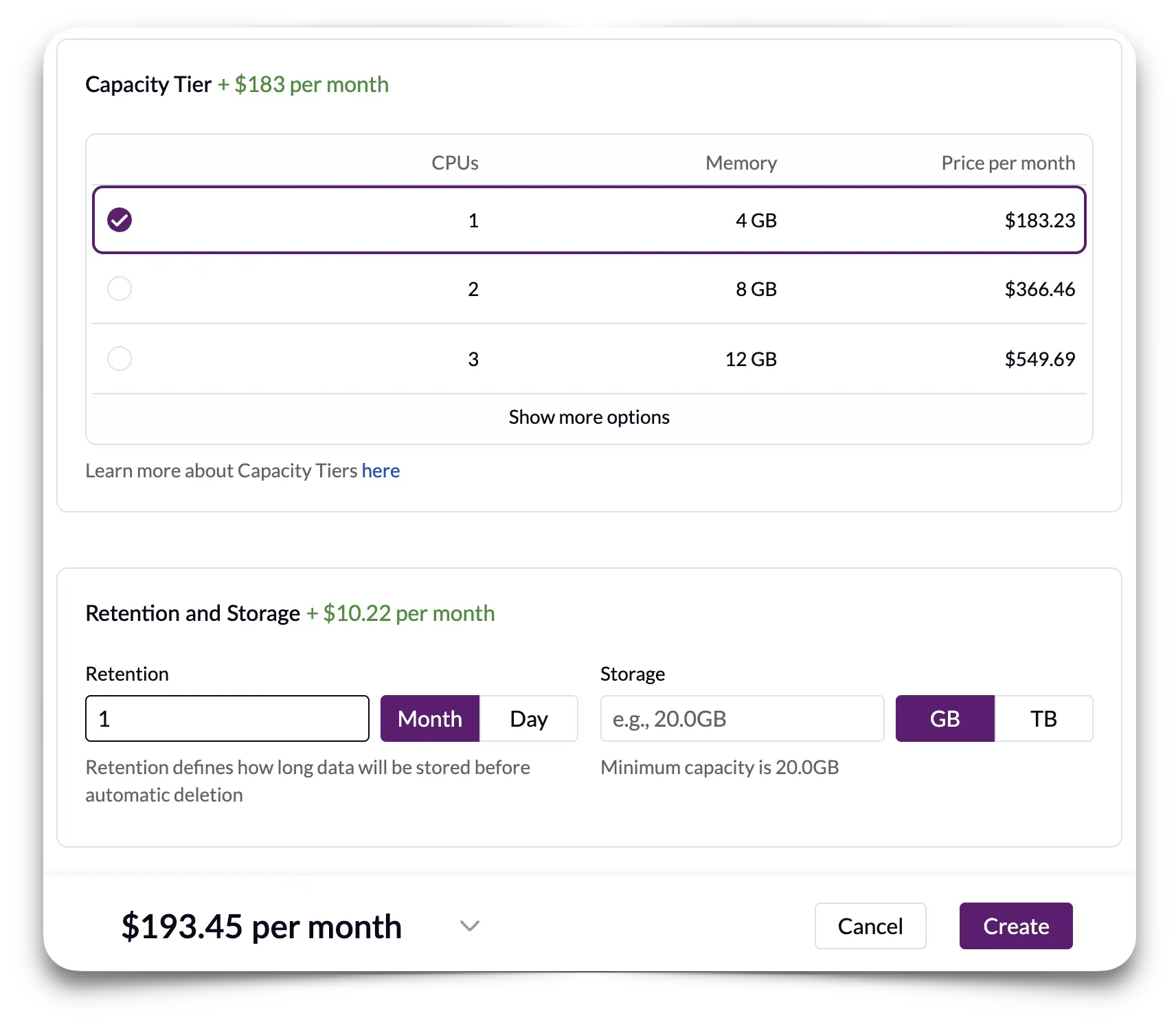
Go to the create page, (i.e. https://console.victoriametrics.cloud/deployments/create#logs), where you can select:
- The Region where you want your instance to run
- The Capacity Tier that will be deployed
- The Retention and Storage to save your data
Not sure which tier or retention to pick?
We have published some of our test results the documentation. You may also learn more about how to estimate the needed compute resources, including storage for your workloads in this FAQ.
Send
#
Now that we have the deployment ready, we need an Access Token to write data to our deployment. We recommend following the easy copy-paste integrations, which you may also find in the docs. But if you were seeking an example, an OpenTelemetry collector integration would just need you to add the bearertokenauth extension and plug it into your otlphttp exporter like this:
config:
  extensions:
    # We are using the token directly, but a filename may also be provided
    # This is used to authenticate with VictoriaMetrics Cloud, and
    # needs to be included in the otlp exporter (see below).
    bearertokenauth:
      scheme: "Bearer"
      token: <MY_TOKEN>
    # ...other extensions go here.

  exporters:
    # Here we define the VictoriaMetrics Cloud endpoint, with auth included.
    otlphttp/cloud:
      logs_endpoint: https://<MY_VMCLOUD_ENDPOINT>/insert/opentelemetry/v1/logs
      auth:
        authenticator: bearertokenauth
    # ...other exporters go here

  service:
    extensions: [bearertokenauth, health_check]
    pipelines:
      # Basic pipeline to collect metrics and send them to VictoriaMetrics Cloud.
      logs:
        receivers: [otlp]
        processors: []
        exporters: [otlphttp/cloud]
      # ...more pipelines go here.
Analyze
#
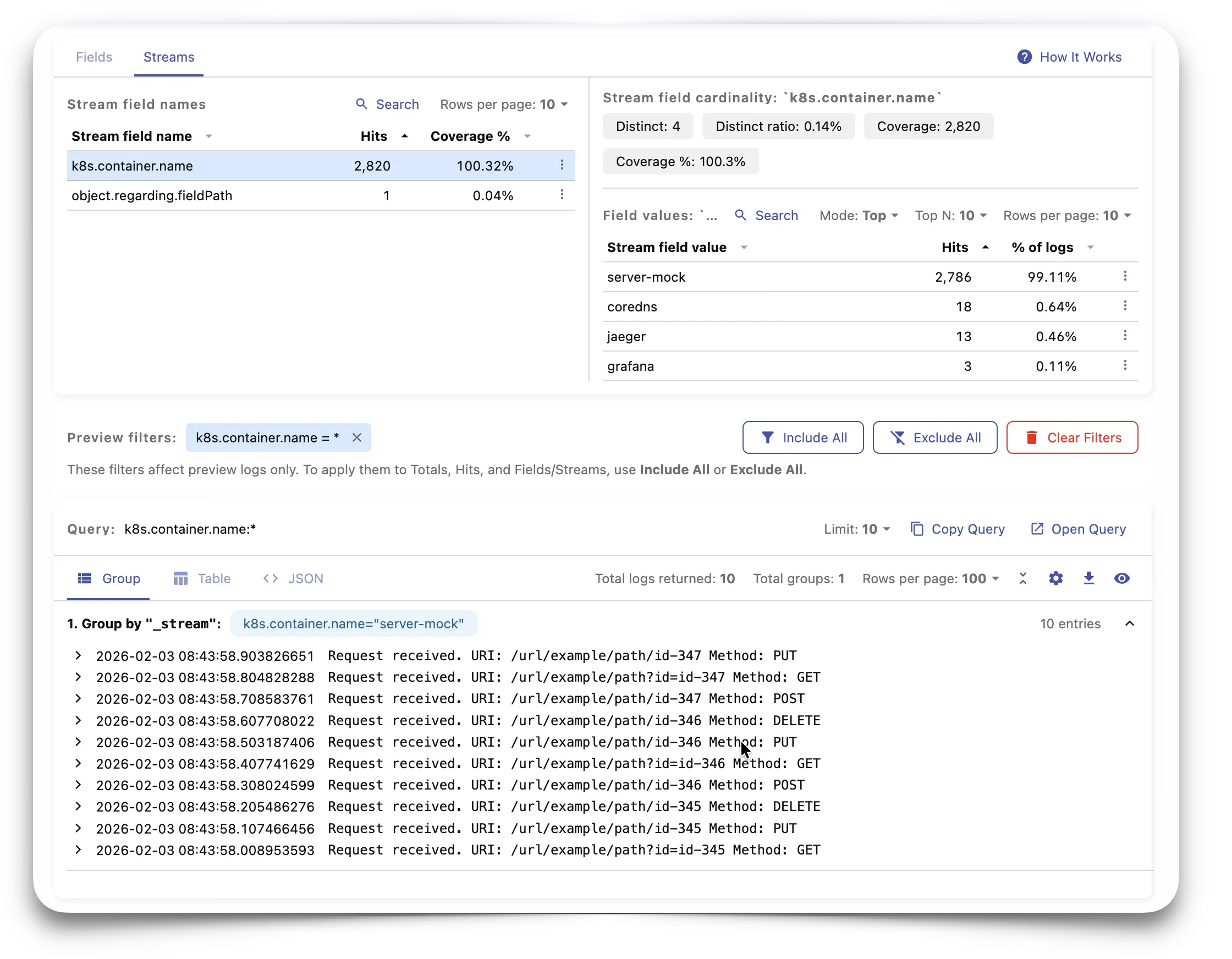
Now it’s time to go check what we’re sending. And for that I’ll be showing an example. I went a bit further, and added the following to my OpenTelemetry exporter config to group streams by containers:
  otlphttp/victorialogs:
    headers:
      VL-Msg-Field: object.note
      VL-Stream-Fields: object.regarding.fieldPath,k8s.container.name
    logs_endpoint: http://vl-svc:9428/insert/opentelemetry/v1/logs
In this way, I’m telling VictoriaLogs to put together everything coming from the same container.
Now I can go to the Explore section
and, in the Overview tab, check which logs are coming from each container, together with hits and
percentage statistics and the queries being used:
I can also move to the Query tab, and use the same queries or being helped by autocompleting
while I write to make an ad-hoc analysis:
Integrate
#
VictoriaMetrics Cloud can easily be integrated with Data Visualization tools like Grafana or Perses.
For example, after using the VictoriaLogs Plugin for Grafana
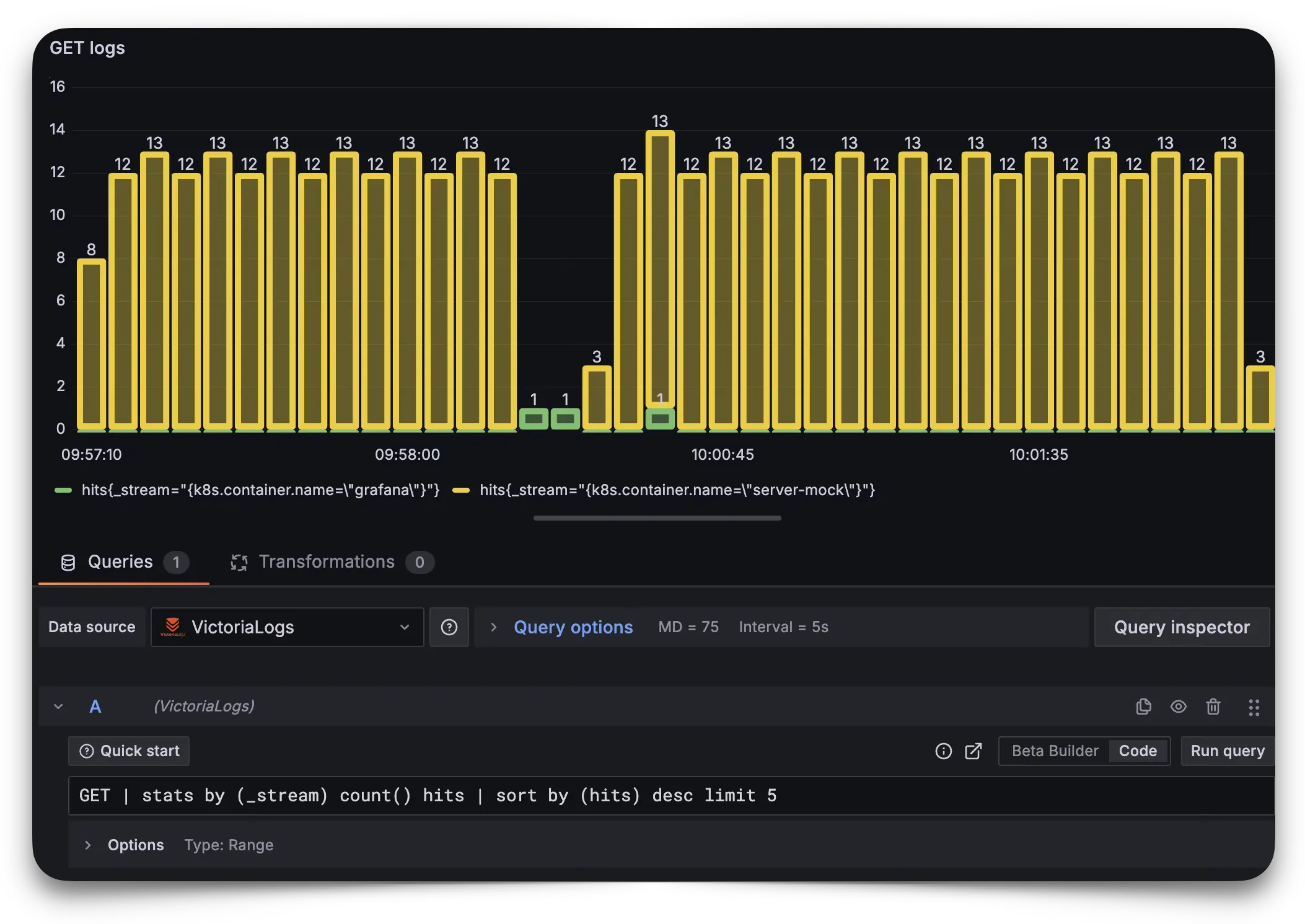
with a Read-only Access Token, a range query can help us to see in real time, inside a dashboard,
the evolution of GET queries received in a server in this way:
GET | stats by (_stream) count() hits | sort by (hits) desc limit 5
It will produce a visualization like this:
Go!
#
Now you have everything needed to get started. You’re ready to start reducing costs and time debugging issues. Of course, it would also be great to know your feedback. Don’t be shy!
A Big Thank You to Our Beta Community
#
We didn’t want to end this post without taking a moment to thank everyone who participated in our closed beta program. Your feedback, bug reports, feature requests, and real-world use cases have been instrumental in shaping VictoriaLogs for VictoriaMetrics Cloud. From helping us refine the UI to stress-testing integrations and pushing the limits of performance, you’ve made this product better in countless ways.
Special thanks as well to those who filled out our feedback surveys sharing your use cases. Your input directly influenced our roadmap, from tier design to integration priorities. We couldn’t have done this without you. ❤️
What’s next?
#
This has been a great start of the year. But that’s just a start. As we said at the beginning of this post: this was only another milestone in our observability journey. And we can’t wait to tell you more about what we’re cooking. Stay tuned!
Leave a comment below or Contact Us if you have any questions!
comments powered by Disqus